What an IP Blacklist Check Means for Email, Login, and Website Access Problems
For admins and users: learn what an IP blacklist check reveals, why IPs are listed, and practical steps to diagnose email, login, and website access failures.
Why Can't You Access Your Email, Login, or a Specific Website?
You sent a customer an invoice, and minutes later the mail server bounced it with a rejection notice that says the sending IP is blocked. Or you opened a service you use every day and saw access denied, while a colleague on the same Wi-Fi signed in without issue. Both failures can come from the same cause: your public IP address has a bad reputation, so an automated system refused the connection before a person ever saw it.
When a server rejects you this way, it is not usually taking a personal decision about you. It is protecting itself. Email providers, VPN gateways, cloud consoles, banks, and website access controls use blocklists to stop known spam sources, abuse infrastructure, stolen-account traffic, and other risky clients. The result is mechanical: the sender's or client's IP appears in a list, so the service rejects the attempt.
A blacklist issue can hide behind many symptoms. Email may bounce with messages such as "blocked", "listed", "550 5.7.1", or "policy violation". A login page may return a generic 403, a CAPTCHA loop, or "unusual activity". A web app may refuse API calls, while a database connection times out. A website visitor may see a hosting access-denied page even though the domain itself is not down.
The useful question is not "why is this service blocking me?" It is "which IP is the service seeing, and is that IP listed?" Your device may have a private address, but the server sees the public IP your network hands to the internet. If you are on a home router, that is often your ISP-assigned public IPv4. If you are on a shared office, that could be a company NAT. If you use a VPN or proxy, the remote server sees the exit IP, not your home address. Once you know that IP, you can check whether it is listed and then decide whether the problem is your device, your provider, your mail setup, or a shared address you cannot control.
If you need a quick first step, run a public IP lookup and an email blacklist check. The What Is My IP tool can show your public address, location, and ISP details, and the blacklist check can test that address against major DNSBL/RBL lists. That gives you the starting point: a clean IP, a listed IP, or a shared/public address that points to a third party.
A second useful detail is the difference between the address your device thinks it has and the address the target server sees. A phone on LTE may use a carrier IP that changes every time you move between towers. A company laptop behind a router may use the company NAT address. A mail client may send through a relay even when the browser uses a different address. Record the source of each IP you test: router WAN, VPN app, cloud provider, mobile carrier, mail relay, or hosting account. When a block happens, the support team can match the failure to the exact path.
What Is an IP Blacklist and Who Manages Them?
The hard part is that a block can come from dozens of independent lists, not one database.
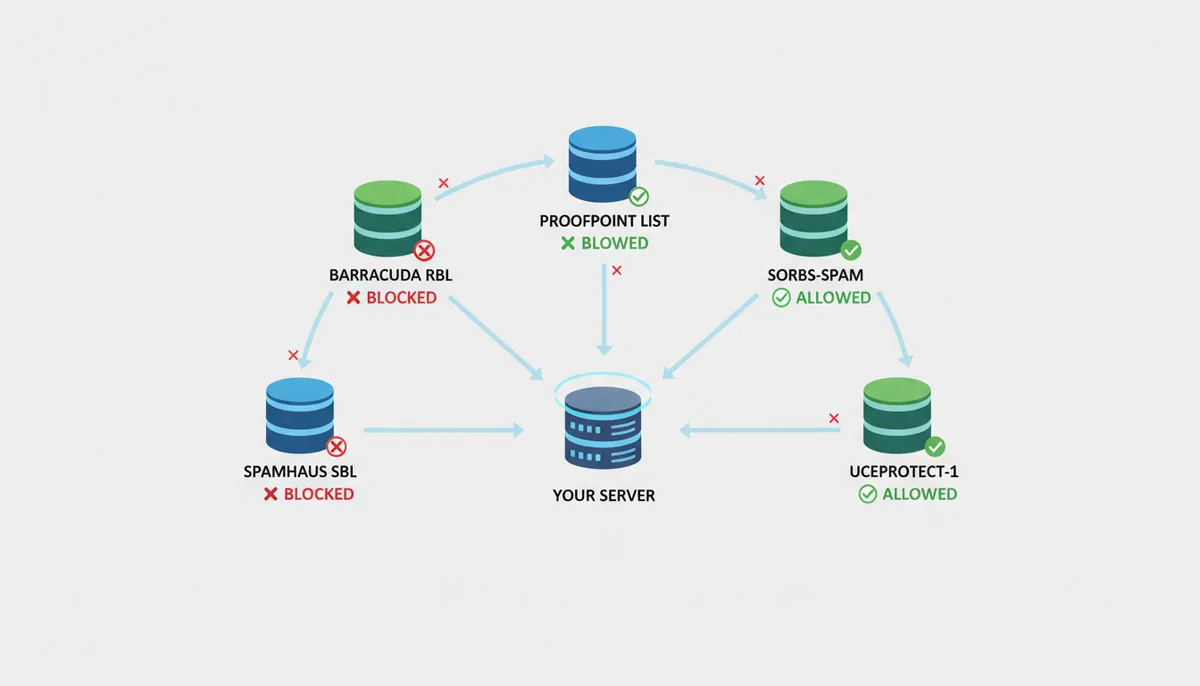
A DNSBL, or DNS-based Blackhole List, is a reputation database exposed through DNS. An RBL is another common name for the same broad category: Real-time Blackhole List. An email server or firewall can ask, "Is this IP listed?" by querying a DNS name that encodes the IP. If the IP is listed, the query returns a special address, often 127.0.0.2. If it is not listed, the query returns no data. That mechanism is fast, cheap, and easy to automate, which is why it became a standard part of email filtering and network access control.
An IP blacklist check asks whether your IP appears on one or more of these lists. It is different from a WHOIS lookup, which shows ownership and registration data, and different from a speed test, which measures throughput and latency. The blacklist result is about reputation: which services have observed enough abuse from this address, or from a range that includes this address, to mark it as undesirable.
There is no single global authority that decides whether your IP is blacklisted. Major operators run their own lists with different rules, reporting thresholds, update cycles, and delisting policies. The Spamhaus Project is one of the most influential. Its SBL, XBL, and PBL lists are widely referenced by mail systems: SBL is commonly associated with spam blacklists, XBL with abuse and intrusion-related entries, and PBL with policy-based blocks for dynamic address ranges or accounts that may not be allowed to send mail directly. Barracuda runs the Barracuda Reputation Block List, or BRBL. SORBS is another well-known list used by many mail filters. There are also smaller, regional, industry-specific, and commercial lists.
This independence matters. Being listed on one list does not prove you are listed on all of them. Being unlisted on one does not prove you are safe. A large mail provider may check a different set of lists than a corporate mail gateway. An email service provider may use its own reputation system, a mix of DNSBLs, spam traps, complaint rates, and heuristics. A VPN provider may block residential IP ranges, datacenter ranges, or known proxy IPs. A website may use its own allow/block rules for app, API, or admin paths.
The practical meaning is that "what is an IP blacklist check" should be treated as a diagnostic, not a verdict. A check answers: which lists currently see your IP as bad, and what are their removal instructions? It does not answer why your IP was reported, whether every downstream service will accept you, or whether your domain reputation is healthy. Those are separate questions.
The lists also differ in style. Some are broad and policy-based: they may block dynamic address ranges that are not expected to send mail. Some are report-driven: an individual complaint, a honeypot hit, or a spam trap can trigger a listing. Some are reputation-based: they look at historical sending behavior, abuse reports, and correlation with known bad infrastructure. Some are narrowly focused: one list may care about phishing links, another about spam volumes, another about compromised hosts. That is why a single "blacklisted" message is too coarse for a real diagnosis.
How Does an IP Address End Up on a Blacklist?
Most listings are not mysterious. They are the result of something on your network sending or attempting to send traffic that another operator considers abusive.
The most common home-user path is malware. A laptop, phone, desktop, or IoT device becomes compromised. The malware may silently use your outbound IP to join a botnet, send phishing mail, scan for weak services, or relay spam. You may never see a window open or a message appear. The network traffic, however, is visible to upstream operators, spam reporting systems, and the mail servers that receive the messages. If enough reports come in, the IP is listed.
For a business, the path is often configuration. A mail server may accept mail for any domain, become an open relay, and be used by third parties to send spam. A shared hosting account may run a compromised plugin, shopping cart, or login form that gets spammed into sending outbound mail. A marketing campaign may be sent from an IP that lacks proper SPF, DKIM, or DMARC, so receiving servers treat it as spoofed or unverified. A new server range may be flagged while it builds a sending history. In each case, the listing can block legitimate email from the same address.
Spam traps are another detection method. These are email addresses that legitimate users should never receive mail to. They are created by anti-spam systems, abandoned domains, harvested addresses, or old cleanup lists. When mail arrives at a spam trap from a particular IP, the operator may treat that as strong evidence of spam. The IP can then be reported or listed. This is why cleaning your email lists, honoring unsubscribe requests, and avoiding purchased lists matter. A single trap hit can be enough for an aggressive list operator.
Some causes are under your direct control. If your PC is infected, you can clean it. If your Wi-Fi password is weak, you can change it. If your mail server is an open relay, you can close it. Other causes are outside your control. You may be on a shared hosting IP where another customer's account sends spam. Your ISP may assign you a dynamic address that was previously used by an abuser. A VPN exit IP may be shared with many users, one of whom triggered a block. The blacklist does not care whose hands typed the message. It reacts to the IP observed on the wire.
Before you open a delisting form, you need to know which of these paths applies to you. Submitting a removal request while the cause is still active is the single most common reason a listing comes back within 24 hours, or the operator rejects your request outright. The table below maps each common cause to the evidence you should look for, the specific fix, and who is responsible for doing it.
| Scenario | What to check | Specific fix | Who handles it |
|---|---|---|---|
| Infected home device or IoT device | Unusual outbound traffic in router logs; a smart camera, printer, or TV showing repeated connections to unfamiliar IP ranges; failed logins on device admin pages | Run a full antivirus and anti-malware scan on every endpoint; factory-reset the compromised IoT device and reconfigure it; change every device password | User (home owner) |
| Weak or open Wi-Fi | Router admin page showing WEP, TKIP, a default SSID password, or an unauthenticated guest network; router firewall disabled; WPS pin enabled | Switch to WPA2-PSK or WPA3; set a unique passphrase of 20+ characters; enable the router firewall; disable WPS; update the router firmware | User (home or office admin) |
| Open mail relay | Attempting to relay mail for a domain you do not own via your MTA; MTA logs showing relay attempts from external IPs without authentication | Configure the MTA to reject mail where the envelope-sender domain does not match an authenticated user; require SMTP AUTH for all relay; restrict relay to the internal subnet only | Mail admin / sysadmin |
| Compromised website or CMS form | Web server access logs showing mass POST requests to contact or comment forms; unexpected files in the CMS upload or public directory; unknown cron jobs or webshells | Update the CMS core and all plugins to the latest release; rotate every admin and database credential; delete injected files; add CAPTCHA to public forms; audit scheduled tasks for unauthorized entries | Host or site admin |
| Bad email list or spam traps | Bounce and complaint rates above 5% in your ESP dashboard; addresses that have not opened an email in 18+ months; list segments sourced from a purchased or scraped vendor | Remove hard bounces and complaint addresses immediately; suppress unsubscribed recipients; scrub the remaining list against a known spam-trap database; stop purchasing or scraping lists | Marketing team / ESP admin |
| Shared hosting or cloud IP | Blacklist check on your specific IP returns a listing; host confirms other accounts share the same IP; neighboring accounts on the server run domains with a spam history | Request an IP migration from your host; file a support ticket citing the specific blacklist hit and the date; if the host cannot migrate you within 48 hours, escalate or move the site to a different IP or provider | Host / hosting provider |
| VPN or proxy exit IP | The IP shown in your VPN client's connection panel is different from your home IP; a blacklist check on the exit IP returns a listing; your home IP checks clean | Disconnect the VPN and confirm your home IP is clean; contact the VPN provider's abuse or support desk with the listed IP; switch to a different exit server or node; if the provider does not rotate the IP, use a different VPN or connect directly | VPN provider |
| Dynamic ISP address with inherited bad reputation | Blacklist check on your current WAN IP returns a listing; the IP was recently reissued after a lease renewal or power cycle; the listing references activity you did not perform | Contact your ISP, provide the specific blacklist name and listing date, and request a new IP from their pool; if the ISP cannot force a reassignment, note the lease expiration and recheck the next day; document the request in case the same range is reissued | ISP |
The reason this step matters more than the delisting form itself: most operators state explicitly in their removal instructions that they will not consider a request until the underlying abuse has stopped. Spamhaus, for example, will reject a delisting request if they can still observe spam traffic from the IP in the 24 hours before the request is filed. Barracuda's BRBL has a similar policy. If you clean the cause and then request removal, you are demonstrating that the problem is fixed. If you request removal while the botnet is still sending from your IP, the operator sees ongoing abuse and either rejects the request or lists you again within hours. Fix first, then ask.
Reading the Bounce Message That Names the List
The fastest way to find out which list blocked you is to read the raw SMTP rejection text, not the human-friendly summary your mail client shows you. Open your mail client, click the bounced message, and switch to "show raw source" or "view full message headers." You will see a block of text that looks like a stack trace. Somewhere in there is the specific list name and the reason code.
Here is what that block typically looks like, with the important lines called out:
From: mailer-daemon@smtp.provider.com
To: you@example.com
Subject: Undeliverable: your invoice to client@theirdomain.com
Return-Path: <you@example.com>
Received: from mail.example.com (mail.example.com [203.0.113.42]) by mx.theirdomain.com with ESMTP id abc123 for <client@theirdomain.com>; Mon, 12 May 2025 09:14:07 +0000
550 5.7.1 The sender domain and IP address [203.0.113.42] have been blacklisted by SBL.spamhaus.org. Delisting information: see sbl.spamhaus.org.
Report-Spam: abuse@spamhaus.org
Three lines matter to you. First, the IP address in square brackets: 203.0.113.42. That is the public address the receiving server saw when your mail arrived. If you are sending through a relay, that is the relay's IP, not your laptop's. If you are on a home connection, that is your router's WAN address. Confirm which one it is before you panic.
Second, the list name: SBL.spamhaus.org. That tells you exactly which operator made the decision and where to go for delisting. If the line says "blacklisted by SORBS" or "listed on PSBL", that is a completely different operator with different removal rules. You cannot delist from Spamhaus by emailing SORBS.
Third, the code: 550 5.7.1. The 550 means permanent failure, not a temporary delay. The 5.7.1 subcode means a policy or security violation, not a syntax error or an unknown recipient. If you see 554 instead, the receiving server rejected the message after accepting the SMTP conversation, which usually points to content filtering rather than an IP list hit. Same "your mail bounced" outcome, different root cause, different fix.
Now run that IP through a blacklist check. If the tool confirms SBL listing, your next step is clear: go to the Spamhaus delisting page, enter the IP, and follow their form. If the tool says the IP is clean on SBL but the bounce still references it, one of three things is happening. The listing is very new and the check tool's cache has not refreshed. The receiving server is checking a different Spamhaus list (XBL rather than SBL). Or the bounce is stale, from a message that was queued hours ago before your IP was already removed.
A mistake people make: they see "blacklisted" in the bounce subject line, assume it is Spamhaus, and go to the wrong delisting page. Or they check their IP, see it is clean, and conclude the bounce was a false alarm, when in fact the mail was sent from a relay IP they never checked. Always match the IP in the bounce to the IP you are testing. If your mail goes through a smart host, an OAuth provider, or a marketing platform, that platform's sending IP is the one that matters, not yours.
The DNS Query Behind Every "You're Listed" Result
When a tool tells you "your IP is on SBL," it performed a specific DNS query. Understanding that query helps you read results correctly and understand why two tools can disagree.
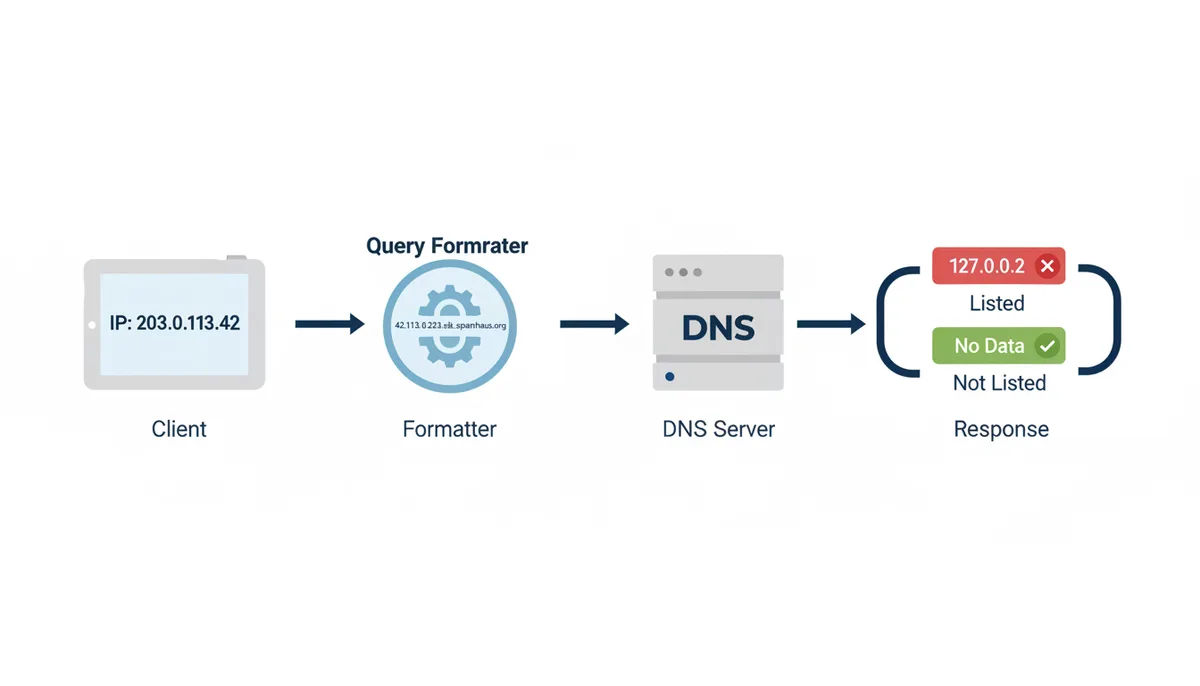
Take the IP 203.0.113.42. To ask the Spamhaus SBL zone whether that address is listed, the tool reverses the octets and appends the list name: 42.113.0.203.sbl.spamhaus.org. It then issues a DNS query for that name, asking for an A record. If the IP is listed, the zone returns a special address: 127.0.0.2. That is the standard "yes, listed" signal. If the IP is not listed, the zone returns no answer (NXDOMAIN) or a no-data response.
The 127.0.0.2 address is not a real destination. It is a flag. You will never route traffic to it. Its presence in the DNS response is the entire answer: yes or no. Some lists use 127.0.0.4 to mean "listed for a different reason than the default" (for example, SORBS uses different 127.0.0.x addresses to distinguish spam from other abuse categories). Others append a TXT record to the query that gives you a human-readable reason, like "this IP was reported by 47 individual users" or "this range is a dynamic pool not expected to send mail."
Why does this matter to you? Three reasons. First, DNS is cached. Your local resolver, your ISP's nameserver, and the tool's server can all hold a cached answer from 10 minutes or 12 hours ago. A tool that says "clean" might be reading a stale NXDOMAIN from a cache entry that expired an hour ago. A tool that says "listed" might be reading a cached 127.0.0.2 from before the operator removed the entry. If you are checking right after submitting a delisting request, this lag is normal. Wait 30 to 60 minutes before assuming the removal did not work.
Second, the query is for one specific zone. SBL, XBL, PBL, BRBL, and PSBL are each separate DNS zones with separate operators, separate update cycles, and separate decision rules. A tool that says "we check 200 lists" is issuing 200 separate DNS queries, one per zone, and aggregating the results. If one zone's nameserver is slow or timing out, the tool might report "clean" when it actually just got no answer back, which is different from a definitive "not listed." Check whether the tool reports "not listed" versus "query failed" for each zone.
Third, some mail servers do not use DNSBLs at all. They use an internal reputation score built from complaint rates, open rates, and historical sending volume. Google's Postmaster Tools, for example, shows you a domain-level reputation grade (poor, fair, good, excellent) that has no direct correspondence to any DNSBL entry. You can be clean on every public list and still have a "poor" domain reputation in Google's system, which will sink your deliverability just as hard. The DNSBL check tells you one layer of the decision. It is not the whole decision.
You Are Clean on the Check, Still Bouncing
The most frustrating scenario: you run a blacklist check, every line says "not listed," and your email still bounces 40 minutes later. The tool is not wrong. The receiving server is just using a different set of inputs than the tool checked.
Here is what typically happens. You test your IP against a panel of 50 to 200 public DNSBLs. You come back clean. But the receiving mail server does not only check public DNSBLs. It may also consult:
- Its own complaint database. If 12 subscribers at that provider marked mail from your IP as spam in the last 7 days, the provider may throttle or reject your next message regardless of what any public list says. This is internal, not queryable from outside.
- A commercial reputation service. Services like Sender Score (by MRI Monitoring) or Cisco's Talos reputation feed assign a 0–100 score to each IP. A score below 50 can trigger rejection even when the IP is on no public DNSBL. These are proprietary databases, not open DNS zones.
- Domain-based checks. The receiving server may reject based on your sending domain's DMARC policy, SPF alignment, or DKIM signature, independent of IP reputation. Your IP can be pristine and your mail still bounces because your domain is not authenticated.
- Rate limits and connection heuristics. If your IP made 40 SMTP connections in 30 seconds, the receiving server may block the next connection on rate-limit grounds alone. No list is involved. The block is temporary and local to that server.
How to tell which of these is actually stopping you. Read the bounce text again, but look past the "listed" keyword. If the rejection says "too many connections" or "rate limit exceeded," that is a heuristic block, not a list. If it says "DMARC failure" or "SPF mismatch," that is an authentication problem, not a reputation problem. If it says "reputation-based rejection" or "sender reputation below threshold," that is a commercial score, not a DNSBL. If it names a specific zone like "rbl.mx2.mail.yahoo.com," that is Yahoo's internal list, not a public one, and you cannot delist it directly. You can only improve your reputation by stopping whatever triggered it and waiting for their scoring window to reset.
A practical test: send a single test message to a free Gmail or Outlook address. Then check the "auth results" or "spam reason" that those providers show in their diagnostic pages (Gmail's Postmaster Tools, Outlook's "message trace"). If the test mail arrives in the spam folder with a note saying "sender reputation: poor," you know the problem is a commercial score, not a DNSBL. The fix is different: you reduce volume, clean your list, and wait out the scoring window.
Sources
- The Spamhaus Project — Claims about what a DNSBL/RBL is, why they exist, and the types of malicious activity (spam, botnets) they track. It's a primary source for the definition and purpose of blacklists.
- IETF (Internet Engineering Task Force) — The technical definitions and standards for protocols mentioned, such as SMTP (for email), and email authentication methods like SPF, DKIM, and DMARC.
- Google Postmaster Tools — Information on how major email providers view and measure IP and domain reputation, supporting the section on proactive reputation management.
- ARIN (American Registry for Internet Numbers) — Fundamental definitions of IP addresses (IPv4, IPv6), ASNs, and how the IP address allocation system is managed.
- SenderScore.org by Validity — The concept of an 'IP reputation score' as a numerical value from 0-100, which helps quantify an IP's trustworthiness for sending email.