Your IP Address Is a Digital Passport: What It Says at a Glance
For everyday internet users: a clear guide on what a public IP address tells you, its limits, privacy risks, and how to mitigate them.
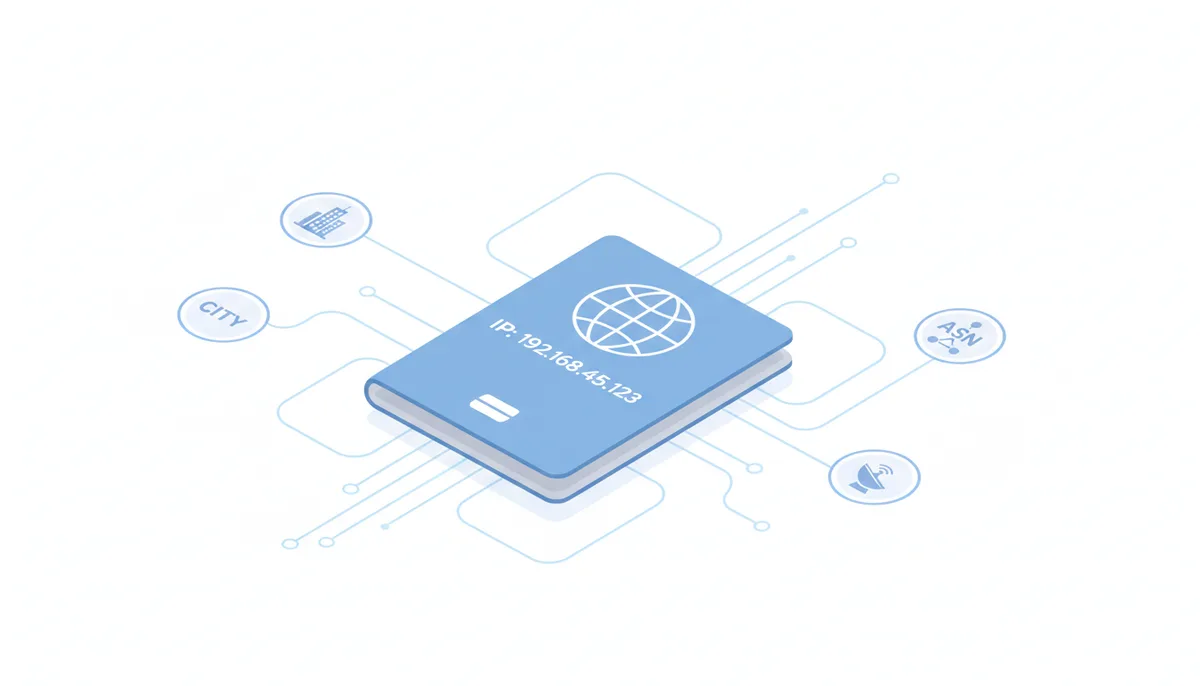
Every time you connect to the internet, your device broadcasts a number that most people never think about—your public IP address. Right now, if you check whatismymyip.com, you'll see something like 192.168.45.123, along with a city name, your internet provider's name, and an ASN number that looks like AS12345. What does all this actually mean?
Think of your public IP address as the return address on every piece of data you send across the internet. When you request a webpage, stream a video, or send an email, the receiving server needs to know where to send the response. That's your public IP's job—it's routing information, not personal information. Your IP doesn't contain your name, phone number, or home address. It's more like having a PO Box number at the post office.
The typical IP lookup result breaks down into four main components. First, there's the IP address itself—a string of numbers that uniquely identifies your internet connection at this moment. Second, you'll see geographic information: usually a city, region, and country. This is an educated guess about where you're located, not a GPS reading. Third, there's your Internet Service Provider (ISP)—the company that actually provides your internet connection, whether that's Comcast, AT&T, or a local provider. Finally, you might see an ASN (Autonomous System Number), which identifies the larger network infrastructure your ISP operates within.
Here's what surprises most people: this information is public by design. The internet couldn't function if routers and servers couldn't figure out where to send data. Every website you visit sees this same information. The real question is what it actually reveals about you, and more importantly, what it doesn't.
How Your Geographic Location Is Estimated From Your IP
Your IP address showing "Chicago, Illinois" doesn't mean the internet knows your street address. IP geolocation is fundamentally an estimation game, and understanding how it works explains why it's sometimes wildly wrong.
IP addresses are distributed in blocks. When your ISP needs more addresses for customers, they request a block from their Regional Internet Registry—organizations like ARIN in North America or RIPE in Europe. These registries record which organization owns each block and roughly where they'll be used. That's the foundation of IP geolocation, but it's just the beginning.
Three main methods refine these rough locations into the city-level guesses you see in IP lookup tools. First, ISPs sometimes voluntarily provide more detailed information about where they've deployed specific IP blocks. If Verizon tells databases that a particular range serves their Philadelphia customers, that improves accuracy. Second, commercial geolocation services collect data from apps and websites where users have shared both their IP address and GPS location. When thousands of phones with IP addresses from a certain range all report GPS coordinates in Denver, it's reasonable to assume that range serves Denver. Third, these services use timing measurements and network topology analysis—if an IP address has very low latency to servers in Seattle and high latency to servers in Miami, it's probably closer to Seattle.
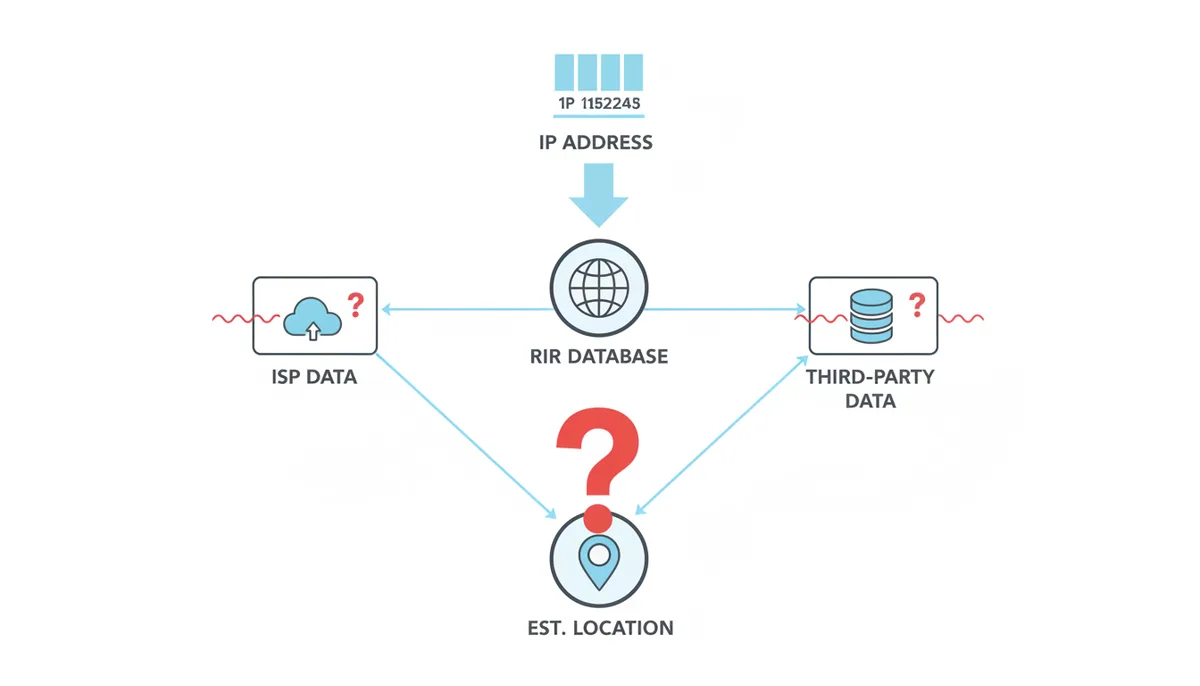
The accuracy varies dramatically by level. Country identification is highly reliable—it's rare for an IP to show the wrong country unless you're using a VPN or proxy. State or region accuracy is generally good in developed countries with mature internet infrastructure, though rural areas often see larger errors. City-level accuracy becomes increasingly approximate, and it's particularly poor in areas where one ISP facility might serve customers across hundreds of miles. Street-level accuracy from IP alone is impossible—despite what crime shows suggest, you can't pinpoint someone's house from their IP address.
Common reasons for incorrect locations include ISPs registering all their IPs to their headquarters address, mobile carriers routing traffic through centralized gateways, and geolocation databases using outdated information. If your IP shows you in a city 200 miles away, it probably means your ISP routes your region's traffic through equipment there. Your actual internet connection still originates from your home—the geolocation just reflects infrastructure you can't see.
Who Owns Your IP? Identifying Your Internet Service Provider (ISP)
Every public IP address has a registered owner, and this information is completely public. When an IP lookup shows "Comcast Cable Communications," that's pulled from official internet registries that anyone can query.
This ownership information comes from the WHOIS system—a public database protocol that's been around since the 1980s. More recently, it's being supplemented by RDAP (Registration Data Access Protocol), which provides the same information in a more structured format. When you look up an IP address, the query goes to one of five Regional Internet Registries (RIRs): ARIN for North America, RIPE NCC for Europe and the Middle East, APNIC for Asia-Pacific, LACNIC for Latin America, or AFRINIC for Africa.
The registry returns information about who owns that IP block, when it was assigned, and contact information for technical and abuse issues. For residential internet customers, this almost always shows your ISP. For businesses, it might show the company directly if they own their own IP space. Universities often show up as the owner for campus connections.
Knowing someone's ISP reveals more than you might think. It tells you whether they're on residential or business internet. Cable company names like Spectrum or Cox indicate home broadband. Seeing "Verizon Wireless" or "T-Mobile USA" means someone's using cellular data. Corporate names suggest they're browsing from work. This context, combined with geolocation, can narrow down someone's situation significantly—"Comcast in Denver" is more specific than just "somewhere in Colorado."
ISPs typically organize their IP addresses geographically, though not always intuitively. A large ISP might have separate IP blocks for different regions, service types (cable vs. fiber), or customer classes (residential vs. business). The specific IP range can sometimes hint at these details, though this varies by provider. What's consistent is that your ISP always knows exactly which customer is using which IP address at any given moment—they must track this for network operations and legal compliance.
What Is an Autonomous System Number (ASN) and Why Does It Matter?
That "AS" number you see in IP lookups—like AS7922 for Comcast or AS15169 for Google—represents something fundamental about how the internet actually works. The internet isn't one giant network; it's thousands of independent networks that agree to exchange traffic.
An Autonomous System (AS) is one of these independent networks. Each one controls a chunk of IP addresses and makes its own decisions about routing traffic. Your home ISP operates an AS. So does Netflix, Amazon, and every major university. These systems use Border Gateway Protocol (BGP) to announce which IP addresses they control and to negotiate how traffic flows between networks.
Think of it this way: if the internet were a postal system, Autonomous Systems would be like national postal services. Each country (AS) handles mail within its borders and has agreements with other countries about international delivery. The ASN is like the country code that identifies which postal system is responsible.
ASN information tells you about the network infrastructure level above your immediate ISP. Sometimes they're the same—Comcast's ASN covers their entire network. But smaller ISPs often operate within a larger provider's AS. A regional ISP might buy wholesale bandwidth from a national carrier, so your IP shows the small ISP as the owner but the large carrier's ASN. This reveals the actual network path your data takes to reach the broader internet.
For technical investigations, ASNs matter because they define administrative boundaries. Each AS has its own abuse contacts, network policies, and routing decisions. If you're tracking down network problems or security issues, knowing the ASN tells you which organization actually controls the infrastructure, not just who sells the service to end users.
Does Your Public IP Address Change? The Difference Between Dynamic and Static IPs
Check your IP address today and again next month—it might be completely different. Or it might be exactly the same. This depends on whether your ISP assigned you a dynamic or static IP address, and understanding the difference matters for privacy and technical reasons.
Most home internet connections use dynamic IP addresses. When your router connects to your ISP, it sends a request using Dynamic Host Configuration Protocol (DHCP): "I need an IP address." The ISP's DHCP server looks at its pool of available addresses and assigns one temporarily. This lease might last 24 hours, a week, or until you disconnect. When the lease expires or you reconnect, you might get the same IP again or a completely different one from the pool.
ISPs prefer dynamic addressing because it's efficient. They don't need one IP address for every customer—just enough for customers who are online simultaneously. If you unplug your router for vacation, that IP returns to the pool for someone else. This system dates back to dial-up days when ISPs had far fewer IP addresses than customers.
| Attribute | Dynamic IP | Static IP |
|---|---|---|
| Assignment Method | Automatic via DHCP | Manual configuration |
| Typical User | Home internet customers | Businesses hosting services |
| Cost | Included in standard service | $5-50/month extra |
| Primary Use Case | Web browsing, streaming, gaming | Web servers, email servers, VPNs |
| Privacy Implication | Harder to track across time periods | Same IP makes tracking easier |
Static IP addresses never change. The ISP assigns a specific address to your account, and you keep it as long as you maintain service. Businesses pay extra for static IPs because they need consistency—running a web server, email server, or VPN requires clients to find you at the same address. Some home users get static IPs for security cameras, game servers, or remote access.
The privacy implications cut both ways. Dynamic IPs make you harder to track over long periods—the IP visiting a website today might belong to someone else next month. But this isn't real anonymity. Your ISP logs which customer had which IP at every moment. With a timestamp and IP address, they can always identify the account holder. Those logs typically persist for months or years, depending on local laws.
Whether your IP changes also depends on your connection stability. Even with dynamic addressing, keeping your router powered on and connected often results in renewing the same IP repeatedly. You might keep the same "dynamic" address for months. Conversely, power outages, router reboots, or ISP maintenance can trigger address changes. There's no reliable way to force a change—unplugging your router might work, or you might get the same IP back.
Can Your Public IP Address Personally Identify You?
Here's the critical distinction most people miss: your IP address doesn't contain your personal information, but it can be used to find it. The difference matters legally and practically.
An IP address is just numbers that identify a network connection. It's not like a phone number that's registered to your name. When someone sees your IP, they don't automatically know who you are. They know your general location and ISP—the same information whatismymyip.com shows you. That's where public information ends.
The link between an IP address and your identity exists in exactly one place: your ISP's customer database. At 3:47 PM on Tuesday, IP address 192.168.45.123 was assigned to account #48573, which belongs to John Smith at 123 Main Street. Only your ISP has this information, and they guard it carefully for both business and legal reasons.
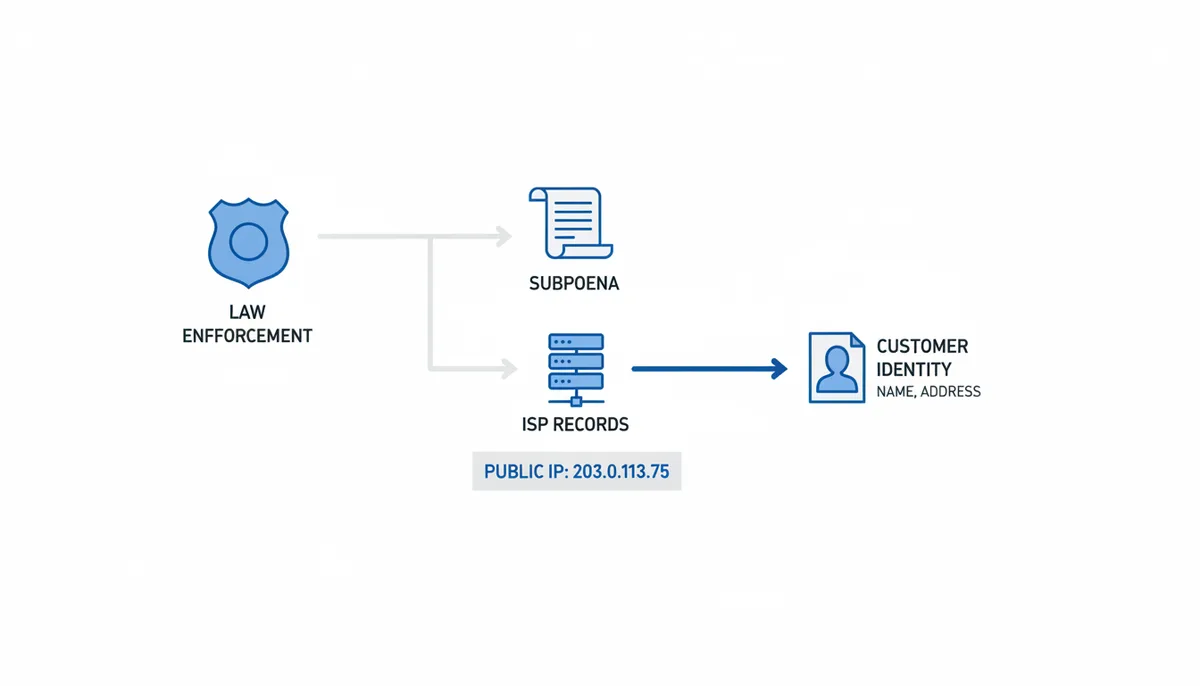
Getting that information requires legal process. In the US, law enforcement needs a subpoena or warrant, depending on what they're seeking. Copyright holders suing file-sharers must convince a judge to issue a subpoena for subscriber information. The ISP then has to comply with valid legal demands but will reject casual requests. "Someone with this IP insulted me online" won't get you their name.
Some countries have stronger privacy protections than others. European GDPR regulations treat IP addresses as personal data, requiring stricter handling. Other jurisdictions have data retention laws mandating ISPs keep logs for specific periods. The consistent factor is that linking an IP to an identity requires ISP cooperation, which generally requires legal compulsion.
Website operators face a different challenge. They can log your IP address—every server does this automatically. But without ISP cooperation, they can't convert that to your name. They can, however, correlate activity. If you log into an account, they can link that IP to your username. If you visit repeatedly, they can track patterns. Combined with cookies and other tracking technologies, IP addresses become part of a larger fingerprint, even without knowing your real name.
What Can Others Actually Do With Your IP Address?
Forget the Hollywood hacking scenes. Someone knowing your IP address can't instantly break into your computer or steal your files. The real risks are more mundane but worth understanding.
The most realistic threat is a Denial of Service (DoS) attack. If someone knows your IP and has enough bandwidth, they can flood your connection with junk traffic until legitimate traffic can't get through. Your internet effectively stops working until the attack ends or your IP changes. Gamers sometimes face this when opponents try to force them offline during matches. Streamers deal with it when viewers get angry. Home connections are especially vulnerable because they have limited bandwidth.
Port scanning represents another genuine risk. Every internet connection has 65,535 possible ports—think of them as doors into your network. Attackers can systematically check which ports are open and what services are running. They're looking for outdated software, misconfigured services, or default passwords. If you're running an old router with unpatched vulnerabilities, an open port might provide entry.
Your home router's firewall blocks most of these attempts automatically. By default, it rejects all incoming connections unless you specifically opened a port for a game or service. This Network Address Translation (NAT) firewall is your primary defense—attackers can knock, but no one's listening. Still, keeping router firmware updated matters because vulnerabilities do emerge.
Less technical but equally real: targeted harassment and social engineering. Knowing someone's city and ISP helps craft convincing phishing attempts. "We're calling from Comcast about an outage in Chicago" sounds more credible when those details match. Combining IP information with data from social media or data breaches creates a fuller picture for social engineering attacks.
What about the myths? No, someone can't install viruses just by knowing your IP. They can't access your computer's files or see what you're doing online. They can't hijack your connection or steal your bandwidth. They can't even determine your exact address—despite what amateur "hackers" claim in online games. These threats require either malware already on your system or serious vulnerabilities you've left unpatched.
How VPNs, Proxies, and Tor Change What Your IP Reveals
Want to change what the world sees when you connect? Three main tools alter your apparent IP address by routing your traffic through intermediate servers. Each works differently and serves different needs.
Virtual Private Networks (VPNs) create an encrypted tunnel between your device and the VPN provider's server. All your internet traffic flows through this tunnel. Websites see the VPN server's IP address, not yours. If you're in Denver using a VPN server in London, sites think you're British. Your ISP sees encrypted traffic to the VPN but can't see what websites you're visiting.
Proxies work simpler—they're just middlemen. You configure your browser or application to route requests through the proxy server. The proxy fetches content and relays it back. Unlike VPNs, basic proxies don't encrypt traffic. Your ISP can still see what sites you're accessing if they're not using HTTPS. Proxies are lighter-weight than VPNs but offer less protection.
Tor (The Onion Router) takes paranoia seriously. Your traffic bounces through three random servers worldwide before reaching its destination. Each hop only knows the previous and next step, not the complete path. Even if someone compromises one server, they can't trace the full connection. This makes Tor the gold standard for anonymity but also the slowest option.
| Attribute | VPN | Proxy | Tor |
|---|---|---|---|
| How it works | Encrypted tunnel to VPN server | Simple relay through proxy server | Multi-hop relay through 3+ servers |
| Primary Purpose | Privacy from ISP, bypass geo-blocks | Bypass firewalls, simple IP masking | Strong anonymity, bypass censorship |
| Level of Encryption | Strong end-to-end to VPN server | Usually none beyond HTTPS | Multiple layers of encryption |
| Who sees your real IP | VPN provider only | Proxy provider only | Entry node only |
Using these tools shifts trust rather than eliminating it. Your ISP can't see your browsing with a VPN, but the VPN provider can. The proxy operator sees everything passing through. Tor's distributed nature means no single entity sees everything, but government agencies have invested heavily in traffic analysis to de-anonymize users. Pick your tool based on your threat model—hiding from your ISP requires less than hiding from nation-states.
Performance impacts vary dramatically. Good VPNs might add 10-20% overhead and increase latency slightly. Free proxies often crawl because everyone's using them. Tor typically runs 3-5 times slower than direct connections due to multiple hops and encryption overhead. For everyday privacy from ISP snooping and ad tracking, a reputable VPN strikes the best balance.
Public vs. Private IPs: Understanding Your Home Network
That IP address whatismymyip.com shows you? Every device in your home shares it. Your laptop, phone, smart TV, and thermostat all appear to websites as the same IP address. Understanding why requires a peek inside your home network.
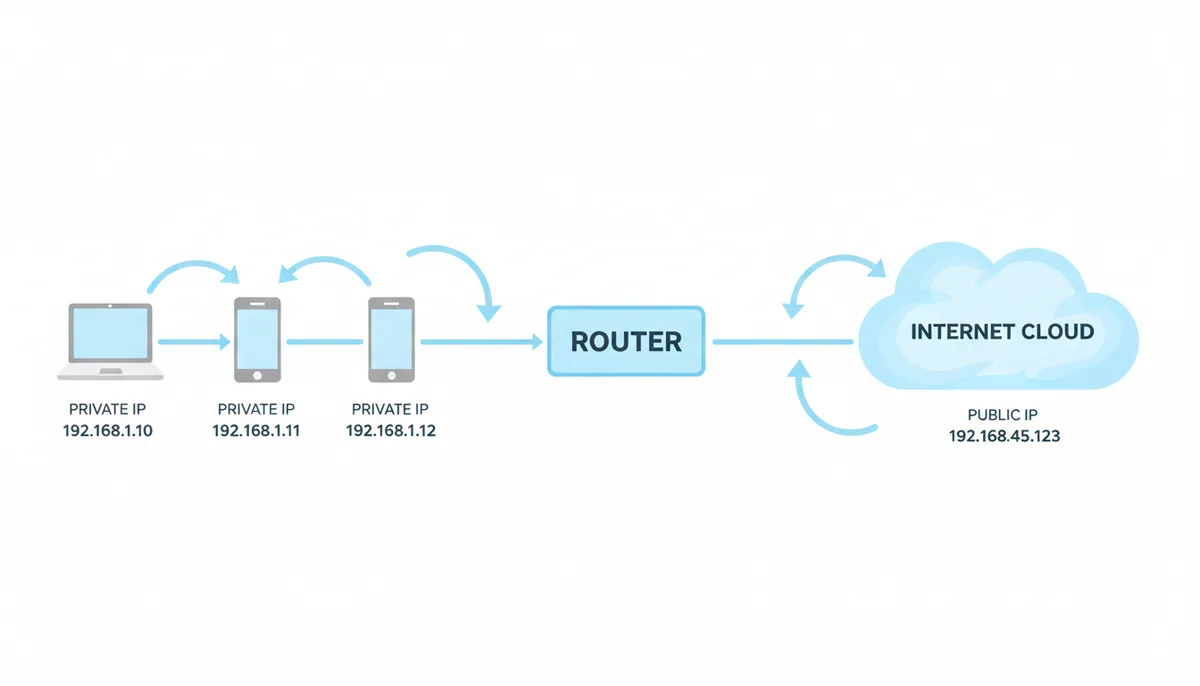
Your router lives a double life. To the internet, it has one identity—your public IP address assigned by your ISP. Inside your home, it creates a private network with its own addressing scheme. Every device gets a private IP address, typically starting with 192.168, 10., or 172.16-31. These ranges are reserved specifically for private networks and don't work on the public internet.
Network Address Translation (NAT) is the magic that makes this work. When your laptop (private IP 192.168.1.105) requests a webpage, your router notes the request and forwards it to the internet using its public IP. When the response comes back, the router remembers which internal device requested it and forwards accordingly. This happens thousands of times per second, transparently.
This system solves a critical problem: IP address exhaustion. IPv4 only has about 4.3 billion possible addresses. Without NAT, we'd have run out in the 1990s. By letting hundreds of devices share one public IP, NAT extended IPv4's life by decades. It also provides accidental security—outside attackers can't directly reach your printer or smart bulb because they don't have public IPs.
You can see this yourself. On Windows, open Command Prompt and type "ipconfig". On Mac or Linux, open Terminal and type "ifconfig" or "ip addr". You'll see your private IP—something like 192.168.1.105. Now check whatismymyip.com. The addresses are completely different. Your computer only knows its private address; the router handles the translation.
This architecture explains some common confusions. When setting up game servers or security cameras for remote access, you must configure "port forwarding" on your router. This tells the router "when traffic arrives on port 8080, send it to the Xbox at 192.168.1.20." Without this explicit mapping, incoming connections have no way to reach specific devices. Your router blocks them by default, which is why your home network is relatively safe from random attacks despite sharing one public IP.
Frequently Asked Questions
If my IP address shows the wrong city, is my internet connection compromised?
No, this is completely normal behavior. IP geolocation is an estimation technique, not GPS tracking. Your ISP likely routes traffic from your area through network equipment in that city. If you're seeing a city 50-200 miles away, that's typical—it just shows where your ISP aggregates regional traffic. Only worry if your IP shows a different country when you're not using a VPN.
Is it illegal to hide my IP address with a VPN?
In most democratic countries, using a VPN for privacy is perfectly legal. Millions use them daily for security on public WiFi, accessing work networks, or maintaining privacy. However, using any tool including VPNs to conduct illegal activities remains illegal. A handful of countries with strict internet controls—including China, Russia, and Iran—restrict or prohibit VPN use, though enforcement varies.
Does my phone have a public IP address?
Yes, but it works differently than your home internet. On WiFi, your phone shares the network's public IP with other connected devices. On cellular data, your carrier assigns an IP, often using Carrier-Grade NAT (CGNAT) where thousands of phones share a smaller pool of public IPs. This is why mobile IPs often geolocate to major cities where carriers have equipment, not your actual location.
Can two people have the same public IP address?
Absolutely. Everyone on the same WiFi network shares one public IP—that includes homes, coffee shops, and offices. Many mobile carriers use CGNAT, meaning hundreds or thousands of phones might share the same public IP simultaneously. Some satellite and fixed wireless ISPs do the same. This shared usage is one reason IP addresses alone can't identify individuals.
How often does my dynamic IP address change?
There's no standard schedule. Some ISPs rotate addresses every 24 hours, others only when your router reconnects. Many customers keep the same dynamic IP for weeks or months if their connection stays stable. Power outages, router reboots, or extended disconnections are most likely to trigger a change. Despite being "dynamic," these addresses are often surprisingly persistent, which is why some privacy-conscious users manually reboot routers periodically.
Will clearing my browser cookies change my IP address?
No, these are completely separate systems. Cookies are small files websites store in your browser to remember preferences and track sessions. Your IP address is assigned by your ISP at the network level. Clearing cookies might make you appear as a new visitor to websites, but they'll still see the same IP address. To change your IP, you need to either reconnect to your ISP (which might not work), use a different network, or employ a VPN.
What Your IP Address Reveals—and What It Doesn't
Your public IP address tells a specific story about your internet connection. It reveals your approximate geographic location—usually within 50 miles in urban areas. It identifies your ISP and gives clues about your connection type. For someone technically inclined, it might hint at whether you're at home, work, or on mobile data.
But that's where public information ends. Your IP doesn't broadcast your name, physical address, or browsing history. It can't be used to hack your computer or install malware remotely. The link between your IP and your identity exists only in your ISP's database, protected by both business interests and legal requirements.
Understanding these boundaries helps you make informed decisions about online privacy. For most users, a router's built-in firewall provides adequate protection against technical threats. If you need to hide your location or ISP from websites, a reputable VPN solves that problem. For serious anonymity needs, Tor provides stronger protections at the cost of speed.
The key is proportional response. Not every internet activity requires maximum anonymity. But knowing what your IP reveals—and to whom—lets you decide when additional privacy tools make sense for your situation. Your public IP address is indeed like a digital passport, showing where you're connecting from and through which provider. Like a real passport, it's sometimes necessary to show it, sometimes wise to keep it private, and always important to understand what information it contains.
How IP Address Tracking Actually Works in Practice: Following the Digital Trail
When a website claims they're "tracking your IP," what does that actually mean? Let's follow a real interaction from both sides to see what information flows where and when.
You visit an online store at 2:15 PM. Your browser sends an HTTP request that includes headers like your browser type and language preferences. Your IP address isn't part of the request—it's part of the underlying TCP/IP connection, like the return address on an envelope. The store's web server automatically logs this connection: "2024-01-15 14:15:33 - GET /products/shoes - 192.168.45.123 - Mozilla/5.0..."
These server logs accumulate quickly. A medium-sized website generates gigabytes of logs daily, each entry stamped with an IP address. By default, most web servers keep logs for 30-90 days before rotation, though some archive them indefinitely. This is passive collection—it happens whether the site intends to track you or not.
Active tracking goes further. The store's analytics software processes these logs in real-time. It groups requests from the same IP: this visitor viewed seven products, spent 3 minutes on the checkout page, then left. If you create an account or make a purchase, they link your IP to that profile. Now they can see that john.doe@email.com usually connects from 192.168.45.123.
Here's where it gets sophisticated. Marketing platforms correlate IP addresses across multiple sites. Company A sees you browsing camping gear from IP 192.168.45.123. Company B, using the same ad network, sees that IP searching for hiking boots. The ad network connects these dots, building a behavioral profile tied to your IP address. They don't know your name, but they know someone at that IP likes outdoor activities.
IP tracking has serious limitations. Dynamic addresses mean the outdoor enthusiast they profiled yesterday might be someone else today. Shared IPs make tracking even messier—that coffee shop IP shows hundreds of different browsing patterns. Mobile IPs change as you move between cell towers. IPv6 addresses, increasingly common, can rotate frequently by design, with devices generating new addresses periodically.
Business services take different approaches. Banks and financial services track IP addresses for fraud detection. If your account usually logs in from New York and suddenly shows activity from Nigeria, that triggers alerts. They maintain databases of "known good" IPs for each customer—your home, office, and regular locations. Some even use behavioral analysis: you always check your balance first, then recent transactions. Someone logging in from a new IP who immediately tries to wire money looks suspicious.
The most aggressive tracking combines multiple fingerprints. Your IP is just one signal among browser configuration, screen resolution, installed fonts, and dozens of other characteristics. This "browser fingerprinting" can identify you even when your IP changes. Researchers have shown that combining just a few attributes creates surprisingly unique profiles—your specific combination of Windows 11, Chrome 120, 1920x1080 resolution, and Pacific timezone might be unique among all visitors.
Understanding this helps you evaluate privacy tools realistically. A VPN changes your apparent IP but doesn't alter other fingerprints. Private browsing prevents local storage but doesn't hide your IP. Even Tor, which randomizes many fingerprints, can be defeated by poor operational security like logging into personal accounts. True privacy requires understanding the complete picture of how tracking works, not just hiding one identifier.
Sources
- Internet Assigned Numbers Authority (IANA) — Claims about the global management of IP address space and the allocation of address blocks to Regional Internet Registries (RIRs).
- ARIN (American Registry for Internet Numbers) — Information on how IP addresses and ASNs are registered and managed in North America, and as the authority for WHOIS/RDAP lookups in its region.
- Internet Engineering Task Force (IETF) — Technical definitions and standards for protocols like IP (RFC 791), DHCP (RFC 2131), and BGP (RFC 4271), and the definition of private address space (RFC 1918).
- Federal Trade Commission (FTC) — The legal definition of Personally Identifiable Information (PII) and the regulatory context for consumer data privacy in the United States.
- Electronic Frontier Foundation (EFF) — Claims about digital privacy rights, the legal standards (subpoenas, warrants) for government access to user data from ISPs, and analysis of tracking technologies.