WhatIsMyIP.com vs WhatIsMyMyIP.com: Which Should You Use to Check Your Public IP?
A clear comparison for users choosing between a fast IP lookup and a fuller diagnostics suite, showing strengths, tools, and when to bookmark each site.
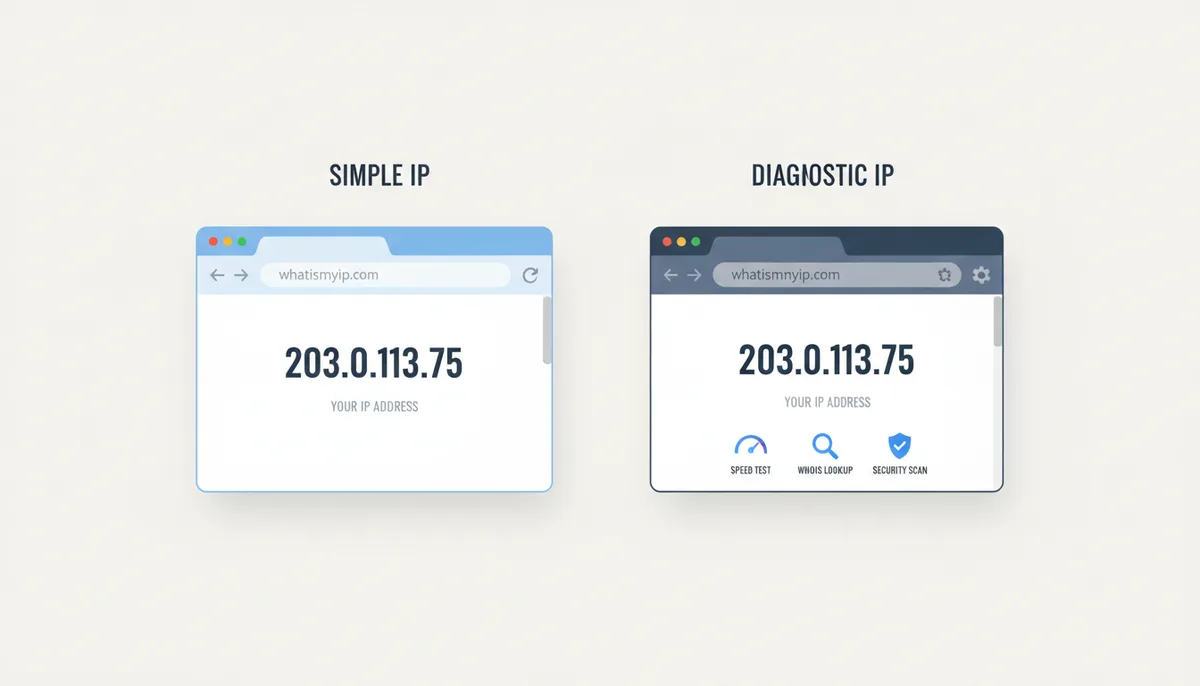
Your VPN swears you're in Amsterdam, and you want proof. So you type "what is my ip" into a search engine — and the results play a small trick on you. Two of the top hits have names that differ by a single syllable: whatismyip.com and whatismymyip.com. They are not the same site. They are not run by the same company. And while both will show you your public IP address within seconds, they're built around two very different ideas of what you came to do.
One is the classic: a page that exists to answer a single question as fast as possible, funded by advertising. The other treats that same question as the front door to a full network diagnostics workbench, funded by subscriptions. Choosing between them isn't about which one is "real" — both are legitimate services. It's about matching the tool to the job you actually have. Here's the honest comparison, feature by feature.
Why Are There Two 'What Is My IP' Sites and Which Should You Trust?
The naming collision isn't an accident, and neither site is a clone or a scam. "What is my IP" is one of the most literal, most-typed queries on the internet — people search the question word for word — so a domain name that matches it almost exactly is valuable real estate. WhatIsMyIP.com got there early and built its reputation on answering that one question. WhatIsMyMyIP.com arrived later with a nearly identical name and a much broader ambition: it wants the IP lookup to be the first thing you do, not the only thing.
They are separate companies, direct competitors, and they make money differently. WhatIsMyIP.com is ad-supported — you pay with a slice of your screen. WhatIsMyMyIP.com is freemium: you can see the model right at the top of the page, where a small counter shows how many free tool uses you have left, next to an Upgrade button. Neither model is sinister. But they shape everything about how the two sites feel and what they push you toward.
As for trust: your public IP address is a fact, not an opinion. Both sites read it from the same place — the connection your browser makes when it requests the page — so both will show you the same number. If one showed you a different IP than the other, the explanation would be boring (you reconnected, your VPN flipped servers, your carrier rotated addresses), not sinister. The trust question only gets interesting when you ask what else each site does with your visit, and that's covered in the privacy section below.
So the real decision framework is simple. WhatIsMyIP.com is optimized for the five-second visit: load, read the number, leave. WhatIsMyMyIP.com is optimized for the twenty-minute session: look up the IP, then test the connection, check a blacklist, verify a VPN, run a WHOIS. Which one deserves your bookmark depends entirely on how often your question has a second clause.
The Core Job: How Do They Compare at Just Checking Your IP?
Load both pages side by side and the philosophical difference shows up within the first two seconds. WhatIsMyIP.com puts your IPv4 address in enormous type at the top of the page — it's genuinely hard to miss, which is exactly the point. Below the number you get a summary: ISP name, city, region, country. Around and between those content blocks, you get display advertising, because that's what pays for the page.
WhatIsMyMyIP.com gives you the same headline number, but frames it with structured detail cards. A typical result shows your country, region, city, timezone, and coordinates, plus an ISP card with the organization name and ASN. That last field deserves a gloss, because it's the one casual users skip and professionals read first. An Autonomous System Number — ASN — identifies the network operator that controls your block of IP addresses. AS16276, for example, belongs to OVH, a large hosting company. That single field tells a practiced eye more than the city name ever will: a hosting ASN means the address lives in a datacenter, not on someone's sofa.
On the pure mechanics of the core job, both sites succeed. The differences are in the texture. WhatIsMyIP.com is arguably faster to the raw digits — there's less page to parse — but its ad scripts load from third-party servers, so the layout can shift under your eyes as ads arrive. WhatIsMyMyIP.com's result block renders first and holds still, and you get meaningfully more context in the same glance. If you need your IPv6 address on a dual-stack connection, expect the legacy site to treat that as a separate check rather than part of the main display.
| Feature | WhatIsMyIP.com | WhatIsMyMyIP.com |
|---|---|---|
| Public IP display (IPv4/IPv6) | IPv4 in oversized type at the top; IPv6 handled as a separate check | IPv4 displayed instantly, framed by location and ISP detail cards |
| Geolocation details | City, region, and country summary | Country, region, city, timezone, and coordinates on load |
| ISP & ASN info | ISP name shown | Organization and ASN shown (e.g., OVH SAS, AS16276) |
| Ad intrusion | Display ads around and between content blocks | Minimal; the lookup result dominates the page |
| Homepage load time | Fast, though ad scripts can add weight and layout shift | Fast; the result block renders first and stays put |
For the single task of "show me my IP," call it a narrow win for the classic site on raw speed to the number, and a clear win for the newer one on how much understanding comes along with it. Reading an IP address to your ISP's support line? Either works. Trying to figure out whether the address looks like a home connection or a datacenter? Only one of them hands you the ASN without making you dig.
What Can You Do Beyond Finding Your IP Address?
An IP address on its own answers exactly one question. The trouble is that people almost never look up their IP for its own sake — there's always a second question attached. Is my VPN actually working? Why did my email start bouncing? Is my connection really this slow, or is it the video app? This is where the two sites stop being comparable and start being different categories of product.
WhatIsMyMyIP.com bundles a full diagnostic suite around the lookup: an internet speed test, an IP blacklist check, WHOIS lookup, proxy and VPN detection, a breach check, and DNS tools, all reachable from the same Network Tools area. Here's what each one is actually for, in the situations where you'd reach for it:
- Speed test. Your video calls keep freezing every afternoon, and you want to know whether to blame the Wi-Fi, the ISP, or the meeting app. A speed test gives you the two numbers that matter: throughput (how much data per second) and latency (how long a packet takes to make the round trip). Calls care about latency — and its jittery cousin, jitter, the variation in delay between packets — far more than raw download speed. A line testing at hundreds of megabits with ugly latency will still produce a miserable call.
- Blacklist check. Your company's invoices start bouncing, and a client's mail server mentions a blocklist. This tool runs your IP against the RBLs — real-time blackhole lists, the shared blocklists that mail servers consult before accepting a message — including well-known ones like Spamhaus. IPs usually land there because a compromised machine on the network sent spam. Knowing which list flagged you is the mandatory first step to getting delisted.
- WHOIS lookup. One address has failed four thousand login attempts against your staging server overnight. WHOIS tells you who owns the block it came from. If the answer is a hosting provider rather than a residential ISP, you've learned something actionable: that's a rented server running a script, not a person in a café, and you can block the range without losing a customer.
- Proxy and VPN detection. Two directions here. On yourself: connect your VPN, reload, and the lookup should show the exit server's city — then the detection tool answers the harder question, which is whether that IP looks like a VPN to the outside world. On others: fraud screening, where an order placed from a known proxy range deserves a second look.
- Breach check. Enter an email address and find out whether it has surfaced in known data breaches. If it has, the correct response isn't panic — it's changing every password you reused from the breached service, starting with your email account itself.
- DNS tools. Your VPN can be perfectly connected while your browser still asks your ISP's servers to translate domain names into addresses — a DNS leak. The tunnel carries your traffic, but the questions about where you're going slip out the side door. A DNS check shows which resolvers actually answered, and an ISP's name in that list is the leak made visible.
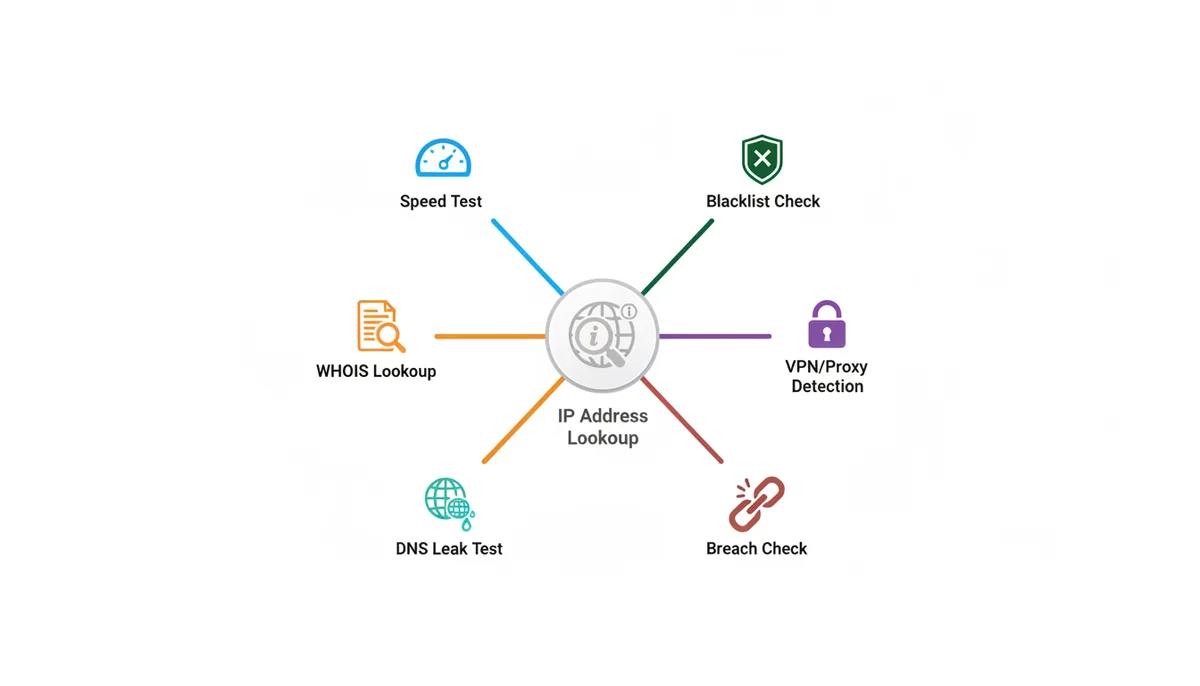
WhatIsMyIP.com has accumulated its own supporting pages over the years — an IP lookup for addresses other than your own, a speed test, WHOIS — and they work. But they read as separate destinations rather than a connected workbench, and the site has never pushed hard into the security-analysis territory where the newer platform spends most of its energy. The fair summary: the legacy site covers the classics; the newer one extends into breach checking, VPN and proxy detection, and DNS diagnostics with a modern interface wrapped around them.
Does integration actually matter, or is it marketing? It matters, for a specific reason: troubleshooting is never one test. You check your IP, then the blacklist, then the speed, then WHOIS on a suspicious address — a chain of three or four lookups. When the whole chain lives on one site under one sign-in, you're not retyping addresses or juggling tabs, and the result of one check sits one click from the next. Each individual tool exists for free somewhere on the internet. The chain is what you're really getting.
How Accurate Is the Geolocation and ISP Data?
Neither site knows where you are, and anyone who tells you IP geolocation is precise is selling something. Here's the mechanism both of them rely on. There's no GPS chip in your IP address. Instead, commercial providers such as MaxMind and IP2Location compile enormous databases that map IP ranges to locations, built from registry allocation records, ISP-provided feeds, routing data, and user corrections. Sites like these two license a database and look your address up in it. Country-level results are usually reliable, because allocations are registered at that level. City-level results are an educated guess. The coordinates — often shown to four decimal places, which looks impressively scientific — typically mark a centroid of the ISP's reported service area, not your house.
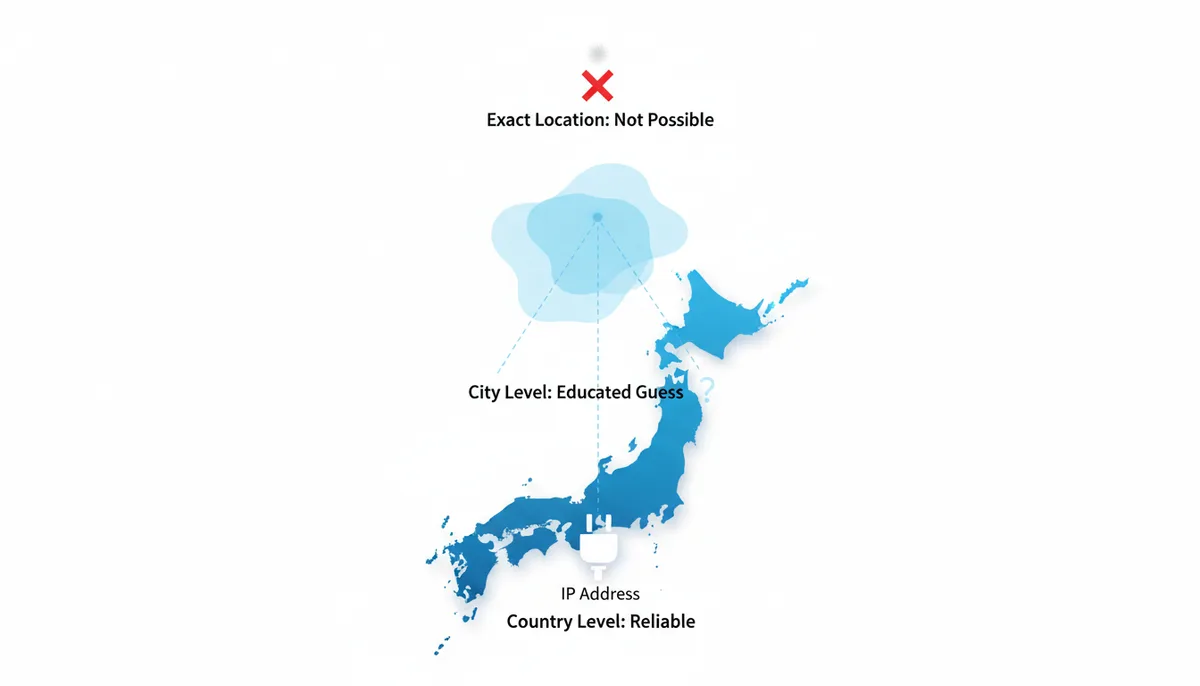
A real example makes this concrete. Load WhatIsMyMyIP.com from a server and you might get a result like 57.128.195.96: country Poland, region Mazovia, city Warsaw, organization OVH SAS, ASN AS16276. Every field there is accurate — about the network. If a person in London routes their browser through that Warsaw server with a VPN, both sites will cheerfully report Warsaw. Neither is wrong. They're reporting where the IP address lives, and the IP address genuinely lives in a Polish datacenter. Your body is not part of the dataset.
The same effect explains the two most common "your site is broken" complaints. Mobile connections often geolocate to the carrier's gateway city, which can be far from where you're standing, because that's where the carrier's network hands traffic to the public internet. And corporate or VPN connections show the exit point, not the desk. If you want to judge either site's accuracy for yourself, run this three-point test on both:
- Home broadband. Expect the correct city or a neighboring one. If the country is wrong, something is genuinely off.
- Your phone on mobile data, Wi-Fi off. Expect the carrier's gateway city, possibly hundreds of kilometers away. That's normal, not an error.
- A VPN connected to a server you chose. Expect the exit city exactly. Anything else means the VPN isn't doing its job — and that's valuable to know.
Run all three through both sites and a pattern emerges: country and ISP/ASN data should agree everywhere, because that comes from objective routing and registry records. City-level results may disagree between the two sites, which tells you they license different databases — not that one is broken. The sharper difference is in how they handle VPN and proxy addresses. A plain lookup on either site will show the exit IP as "yours" without complaint. The question is whether the site then tells you the address belongs to a known VPN or hosting range. WhatIsMyMyIP.com builds that check in as a dedicated tool; on a bare lookup page elsewhere, you're left to judge the ASN yourself. Rule of thumb: trust the ASN more than the city, always.
Comparing the User Experience and Interface Design
Design is where the age gap between these two sites shows most clearly. WhatIsMyIP.com looks like what it is: a page that found its winning formula years ago and kept it. The layout is utilitarian, the navigation has accumulated pages the way a hardware store accumulates inventory, and the ads compete with the content for your attention. Its one undeniable design virtue is the number itself — the largest thing on the page, unmissable, which is exactly right when you're reading an IP address out loud to a support agent and can't afford to misread a digit.
WhatIsMyMyIP.com feels like a tool built recently, because it is. The result arrives as cards — IP, location, ISP — that you can absorb in one glance without scrolling. There's a theme toggle for dark mode, sign-in for tracking your usage, and that ever-present quota counter reminding you the free tier is metered. It reads as a dashboard you'd keep pinned in a browser tab rather than a page you visit once a year.
On mobile, the test that matters isn't whether the sites are responsive — both are — it's two practical things: is your IP visible above the fold on a phone screen, and can you copy it without pinch-zooming? The legacy site's ad placements can push the actual answer downward on a small screen, which is irritating precisely when you're standing in a server closet or troubleshooting from the couch. The newer site's stacked cards survive the narrow screen better.
My honest take: if you check your IP once a month, ignore everything in this section and use whichever site loads first. If you check it daily for work — verifying VPN states, screening addresses, running diagnostics — the interface that shows IP, location, and ISP in one still glance, without ad-driven layout jumps, saves you real time over a year. The trade-off is that the modern site will eventually ask you to sign up or upgrade when you hit the free quota, while the legacy site never asks for anything, because the ads already paid for your visit.
For Professionals: What Do Paid Plans and APIs Offer?
Everything up to this point is free on both sites — the differences sharpen once you hit the limits of free. And the limits are different in kind. WhatIsMyIP.com has no account system and no quota; the whole site is free because the ads pay for it. WhatIsMyMyIP.com meters you: a counter at the top of the page shows how many free tool uses you have left, and once it runs dry you're asked to sign in or upgrade. For a casual user that counter never matters. For someone running diagnostics daily, it's the moment the comparison stops being about features and starts being about workflow.
What does paying actually unlock? The pricing page lays out the tiers and answers the standard subscription questions — whether you can change plans anytime, whether there's a free trial, which payment methods are accepted — so the billing is self-serve rather than a sales-call ordeal. I won't quote specific prices or rate limits here, because those are exactly the details that change between the day an article is written and the day you read it; the pricing page is the only honest source for current numbers. What I can say structurally: the paid plans exist to lift the free quota and to open up API access, and that second part is the real dividing line between the two sites.
An API — application programming interface — means your software talks to the service directly instead of you loading a web page. You send an IP address in a request, you get structured data back, and no human touches a browser. WhatIsMyMyIP.com includes API access with its paid plans; WhatIsMyIP.com has never made a public API part of its offering. If your job involves more than a handful of lookups a day, that difference is the whole argument. Two examples of where it pays for itself:
- Fraud screening at checkout. An e-commerce team pipes each order's IP through VPN/proxy detection and geolocation automatically. An order whose IP sits in a datacenter ASN on a different continent from the shipping address gets flagged for review — thousands of checks a day, none of them by hand.
- Log enrichment. A security analyst takes a week of firewall logs — tens of thousands of addresses — and bulk-attaches ASN, organization, and blacklist status to each one, turning a wall of numbers into a short list of networks worth blocking.
Neither workflow is possible by pasting addresses into a web form, no matter how good the form is. That's the honest case for upgrading.
So, by person. If you check your IP a few times a month, stay free — either site works, and the legacy one if you want no accounts and no counters at all. If you run manual diagnostics most days but only a few at a time, the free tier of the suite covers you until the counter says otherwise, and signing in is a fair price for the integrated tools. If you're a developer, analyst, or business that needs lookups automated, bulk-checked, or wired into your own software, the paid plan with API access is the only path of the two — the legacy site simply isn't built for that job, and no amount of affection for it changes that.
A Worked Example: Running Down a Bounced Email
The bounce message lands in your inbox with the line nobody wants to read: "rejected — your IP is listed in Spamhaus." Your invoices are not reaching clients. Here's how this actually gets fixed, and where each site fits in the chain.
The first mistake almost everyone makes: they look up their home IP. Wrong address. The blacklisted IP is the one your mail server sends from, which is usually your hosting provider's machine, not your laptop. Find it in the bounce message headers or your mail provider's documentation. That single mix-up costs people an afternoon of checking the wrong address and finding nothing.
Once you have the right IP, the chain looks like this:
- Look up the address. Paste the sending IP into an IP lookup and read two fields: the organization and the ASN. If the ASN belongs to a hosting company rather than a residential ISP, the mail came from a rented server — normal for a business on hosted email, and it tells you who to call later. Either site can do this lookup; WhatIsMyMyIP.com puts the ASN on the result card without extra digging, and its WHOIS tool is one click away when you need the full ownership record for the block.
- Run the blacklist check. This is the step the legacy site can't help with — checking an address against the RBLs isn't part of its toolset. WhatIsMyMyIP.com's blacklist check runs the IP against the major lists, Spamhaus among them, and shows exactly which ones have it flagged. That specificity matters, because the fix for one list does nothing for another, and "you're listed somewhere" is not a diagnosis.
- Read the listing reason before touching anything. Blocklists distinguish between "this IP was seen sending spam" and "this IP sits in a range that should never send mail directly," such as dynamic residential pools. The first means something on that server sent junk. The second means your mail is configured to send from an address that was never meant to originate email — a classic self-hosting mistake on an office connection.
- Work out whose problem it is: shared or dedicated. On shared hosting, dozens of other customers send from the same IP, and one compromised account among them can get the whole address listed. Your fix is a support ticket with the provider — only they can clean it up. On a dedicated IP or VPS, the spam came from your machine: a stolen mailbox password, a hijacked contact form, malware. Delisting without finding the hole just gets you relisted, usually faster the second time.
- Delist at the source. Neither IP site can remove you from a list — they only report what the lists say. Each blocklist runs its own removal process, typically a lookup-and-request page on the list's own website; Spamhaus, for instance, offers self-service removal for many listing types. Do this after the root cause is fixed, because lists track repeat listings and a second one is harder to shake.
- Retest. Removal isn't instant — give it hours, not minutes — then run the blacklist check on the same IP again. If it comes back clean across the board, send a test message to the address that bounced. Still failing with clean lists? The recipient's server may be caching the old reputation, and time or a manual whitelist request on their end finishes the job.
The diagnostic half — steps one through three — takes about ten minutes on a site where the lookup, WHOIS, and blacklist check sit in one place. The repair half depends on your provider and the list. The step people skip is four, the root cause, and skipping it is why the bounces come back the following week.
Sources
- American Registry for Internet Numbers (ARIN) — Claims about how IP addresses and ASNs are allocated to ISPs in the North American region.
- RIPE Network Coordination Centre (RIPE NCC) — Information on IP address and ASN management in Europe, the Middle East, and parts of Central Asia, backing up the global nature of ISP data.
- IETF RFC 1918 - Address Allocation for Private Internets — The technical standard defining private IP address ranges, used to explain why websites cannot see a user's local IP.
- MaxMind — Information about the source and nature of IP geolocation databases, supporting the section on data accuracy.
- The Spamhaus Project — Authoritative information on how IP-based blacklists (RBLs) work, backing the claims made in the 'Blacklist Check' tool section.
- Electronic Frontier Foundation (EFF) — General principles and best practices for online privacy, providing a framework for evaluating the privacy policies of both services.