How to Read WHOIS Lookup Results Without Guessing at Every Field
For security pros and brand owners: a practical, field-by-field guide to understanding WHOIS results, privacy redaction, status codes, and IP WHOIS.
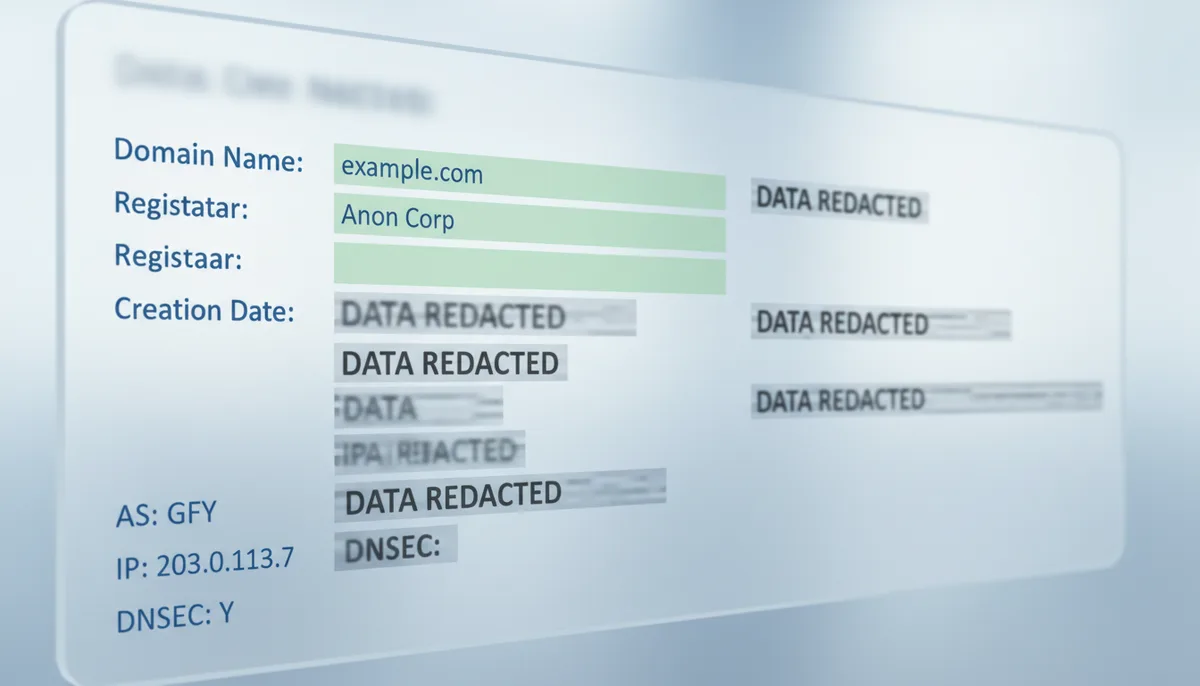
You’ve just run a WHOIS lookup on a domain that looks suspicious, or perhaps you're trying to track down the owner of a site that is infringing on your trademark. Instead of a clear name and email address, you're staring at a wall of cryptic abbreviations, dates, and "Data Redacted" placeholders. It feels like looking at a flight manifest where every passenger's name has been replaced by a serial number.
This isn't a bug; it's how the internet works now. Between privacy laws and the technical layers of domain management, a WHOIS record is no longer a simple contact card. It is a diagnostic log that requires a specific way of reading to be useful. If you don't know how to distinguish between a Registrar and a Registry, or why a domain is sitting in "redemptionPeriod," you'll waste hours chasing the wrong people or misinterpreting a technical error as a security threat.
This guide will teach you how to look past the noise. We will break down exactly what those fields mean, how to navigate the privacy wall, and how to pivot from domain lookups to IP lookups when the domain name itself doesn't give you the answers you need.
Why Bother Reading a WHOIS Record in the First Place?
A WHOIS record is a piece of the internet's fundamental plumbing. It is essentially a public ledger that tracks who is responsible for which pieces of digital real estate. While it might seem like a relic of an older, less private web, it remains the primary tool for three specific, high-stakes tasks.
1. Reporting Abuse
If a domain is hosting a phishing site or sending out massive volumes of spam, you cannot simply email "admin@domain.com" and expect a result. Most of the time, that address is dead or hidden. A WHOIS lookup allows you to find the "Abuse Contact" for the Registrar. This is the specific department tasked with handling complaints. By reporting the domain to the Registrar rather than the (likely non-existent) owner, you trigger a process that can actually result in the site being taken down.
2. Resolving Ownership and Business Inquiries
If you want to buy a premium domain, or if you need to send a formal legal cease-and-desist, you need to know who has the legal right to the name. A WHOIS record helps you identify the "Registrant"—the entity that actually holds the rights. Even if the personal details are redacted, the record will point you toward a proxy service or a specific contact method that legally binds that person to the domain.
3. Debugging Network and DNS Failures
When a website goes dark, the problem is often not the content, but the connection. WHOIS data reveals the Name Servers (NS) managing the domain. If you see a mismatch between what you expect and what the WHOIS record shows, you've found your culprit: a DNS misconfiguration or a hijacked domain. It allows you to see exactly where the "map" of the domain is pointing before you start troubleshooting the server itself.
The Anatomy of a WHOIS Record: A Field-by-Field Breakdown
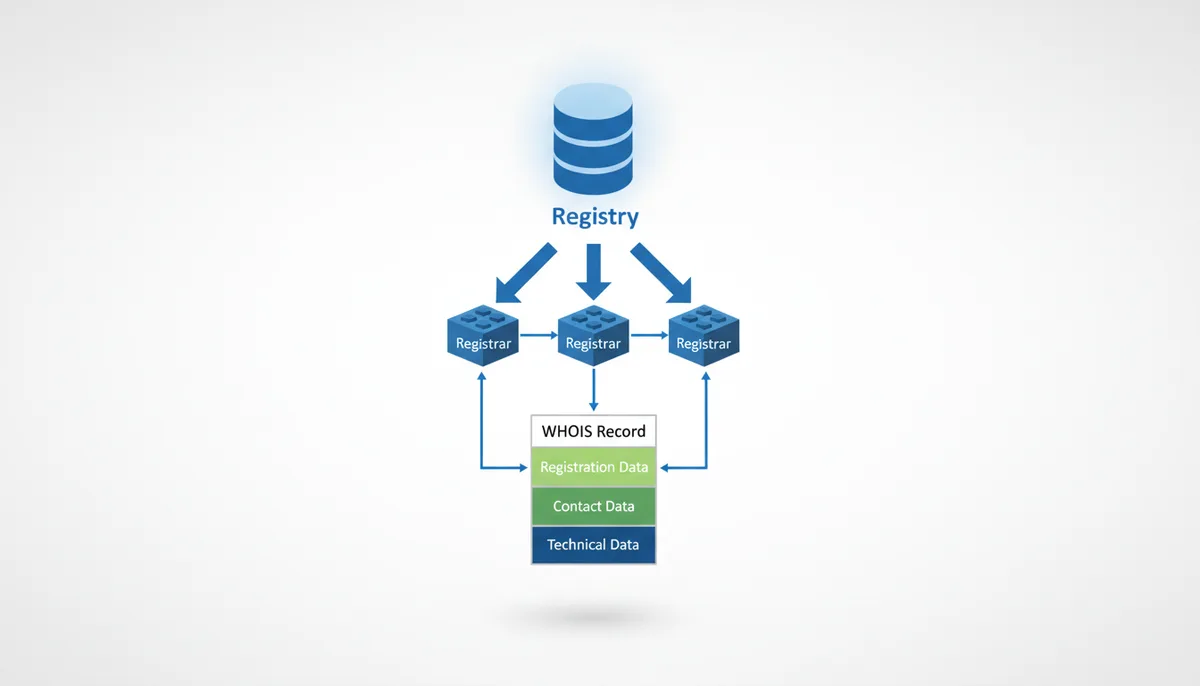
To read a WHOIS record, you must first understand the hierarchy of the internet. Most people use the terms "Registry" and "Registrar" interchangeably, but confusing them is a mistake that will stall any investigation. The Registry is the master database manager for a specific extension (like Verisign for .com or PIR for .org). They don't sell to the public. The Registrar is the company you actually pay—like GoDaddy or Namecheap—to act as your agent with the Registry.
A WHOIS record is typically organized into three clusters: Registration Data, Contact Data, and Technical Data. Knowing which cluster you are looking at determines whether you are looking for a person, a company, or a piece of hardware.
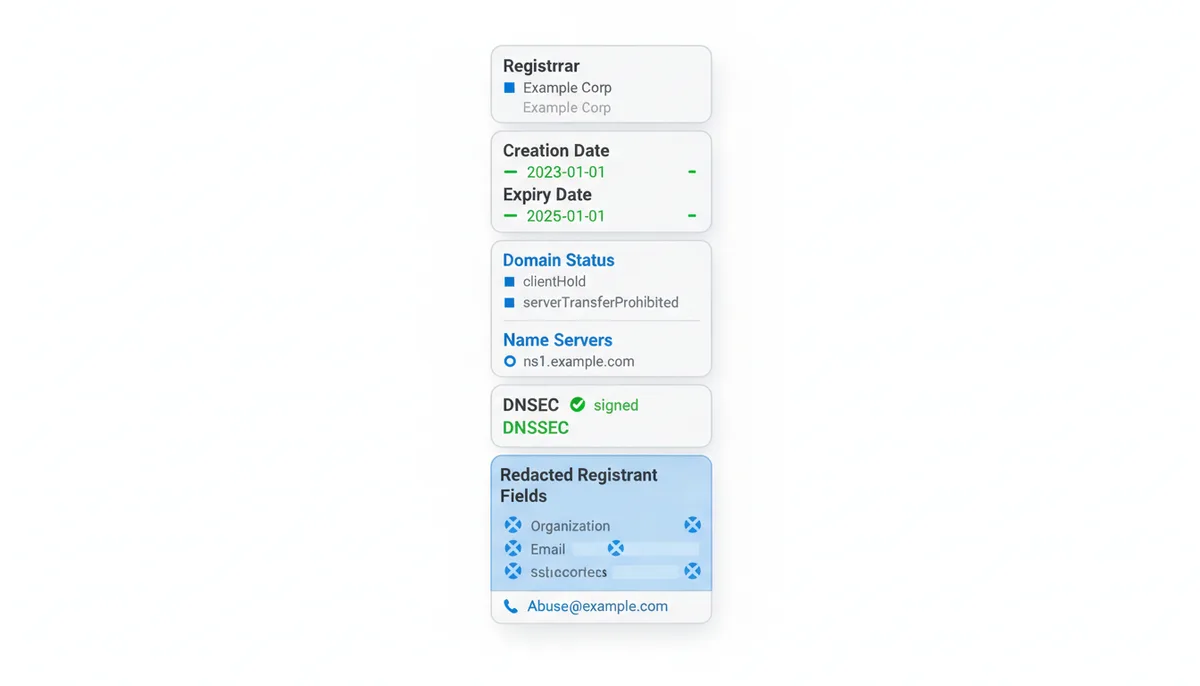
| Field Category | Field Name | What It Means & Example | How to Use It |
|---|---|---|---|
| Registration Data | Domain Name | The specific hostname being queried (e.g., example.com). |
Confirms you are looking at the correct asset. |
| Registrar | The company where the domain was purchased (e.g., GoDaddy, LLC). |
The primary entity to contact for abuse or ownership disputes. | |
| Creation Date | The timestamp of the original registration (e.g., 2015-05-12T10:00:00Z). |
Helps identify "aged" domains versus brand-new phishing sites. | |
| Expiration Date | The date the current registration term ends (e.g., 2025-05-12). |
Critical for timing acquisitions or predicting service outages. | |
| Contact Data | Registrant | The legal owner. Often redacted (e.g., Data Redacted). |
The target for legal notices or purchase offers. |
| Admin Contact | The person managing the domain (e.g., admin@company.com). |
The contact for policy, billing, or management issues. | |
| Tech Contact | The technical administrator (e.g., noc@isp.net). |
The contact for DNS or server-side troubleshooting. | |
| Abuse Contact | The contact for reporting violations (e.g., abuse@registrar.com). |
The most important field for reporting spam or phishing. | |
| Technical Data | Name Server (NS) | The servers directing traffic (e.g., ns1.cloudflare.com). |
Used to see where the site is hosted or if DNS is hijacked. |
| Domain Status | The EPP status code (e.g., clientTransferProhibited). |
Reveals if the domain is active, locked, or suspended. | |
| DNSSEC | Indicates if security extensions are active (e.g., signed). |
A security flag; active DNSSEC makes spoofing much harder. |
Decoding Contact Roles: Who to Contact and When
A common mistake is assuming that every person listed in a WHOIS record has the same power. In professional domain management, roles are strictly defined. When you are looking at a record, you need to identify which "hat" the contact is wearing before you decide how to reach out.
The Registrant (The Owner)
This is the most important role. The Registrant is the legal entity or person who owns the domain. If you want to buy the domain, or if you are a lawyer serving a notice, the Registrant is your target. Note that in many modern records, the Registrant's name is replaced by a privacy service, but the legal responsibility remains with them.
The Administrative Contact (The Manager)
The Admin-C is the person authorized to make decisions about the domain. They handle renewals, change the billing information, or authorize a transfer to a different registrar. If you are trying to resolve a dispute about a domain being expired or incorrectly managed, you are looking for the Admin contact.
The Technical Contact (The Engineer)
The Tech-C is responsible for the actual technical configuration. They manage the Name Servers and the DNS records. If a website is down because of a configuration error, the Tech contact is the person who (theoretically) needs to fix it. In small operations, the Registrant, Admin, and Tech are often the same person. In large corporations, these are three entirely different departments.
A Simple Decision Framework:
- I want to buy this domain: Target the Registrant.
- I want to resolve a billing or policy dispute: Target the Admin.
- The site is down due to a DNS error: Target the Tech contact.
Interpreting Domain Status Codes: Is 'OK' Always Okay?
At the bottom of most WHOIS records, you will find a line labeled "Domain Status" or "Event Status." These are not just descriptions; they are EPP (Extensible Provisioning Protocol) codes that dictate exactly what can and cannot happen with the domain. If you see anything other than "ok," the domain is likely in a state of transition, restriction, or failure.
The most frequent status you will encounter is clientTransferProhibited. Do not panic when you see this. It is actually a standard security feature used by almost all registrars to prevent "domain hijacking." It means the domain cannot be moved to another registrar unless the owner manually unlocks it. It is a sign of a healthy, secured domain.
However, other codes are much more serious. serverHold means the Registry has removed the domain from the internet. This usually happens because of a legal dispute, a failure to verify contact information, or a massive abuse complaint. If a domain is on serverHold, the website will stop resolving immediately.
The most critical period for those watching domain availability is the redemptionPeriod. This occurs after the grace period for a missed renewal has expired. During this time, the domain is essentially "in limbo"—it is no longer active, but it hasn't been deleted yet. It is the last window to save the domain before it returns to the open market.
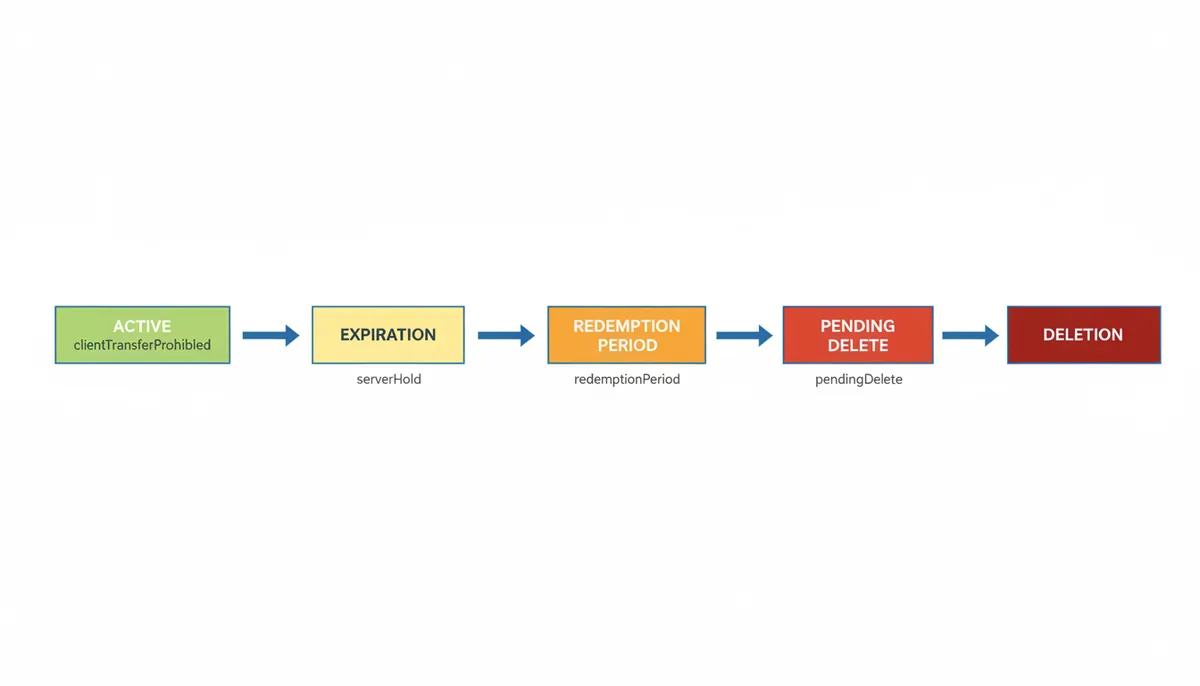
Understanding this lifecycle allows you to time your moves. If you are waiting for a domain to expire, you shouldn't just wait for it to disappear; you need to watch for the transition from the expiration date to the grace period, and finally to the redemption period. Trying to buy a domain while it is in a redemption period is significantly more expensive than waiting for it to hit the deletion phase.
The Wall of Privacy: Reading Redacted and Proxied Results
If you are looking for a name and address and instead find "Data Redacted" or "REDACTED FOR PRIVACY," you have hit the post-GDPR landscape. Since the implementation of major privacy regulations, most registrars automatically scrub personal details from public WHOIS queries to protect users from stalking and spam.
There are two ways this looks in practice:
- Regulatory Redaction: The registry simply hides the data. You see the Registrar and the Name Servers, but the Registrant name, email, and phone number are gone. This is the default for almost all .com, .net, and .org domains today.
- WHOIS Privacy/Proxy Services: This is a commercial product. The owner pays an extra fee to have a proxy company (like "Domains By Proxy") act as the public face of the domain. In these cases, the WHOIS record will show the proxy company's contact details instead of the owner's.
When you encounter this, your investigation isn't over; it just changes direction. You will notice a specific "Registrant Email" that looks like a long, random string (e.g., abc123xyz@proxy-service.com). This is not a mistake. It is a "blind" email address. When you send an email to that address, the proxy service receives it, strips your personal information, and forwards it to the actual owner. This is the standard, legally compliant way to contact a private owner.
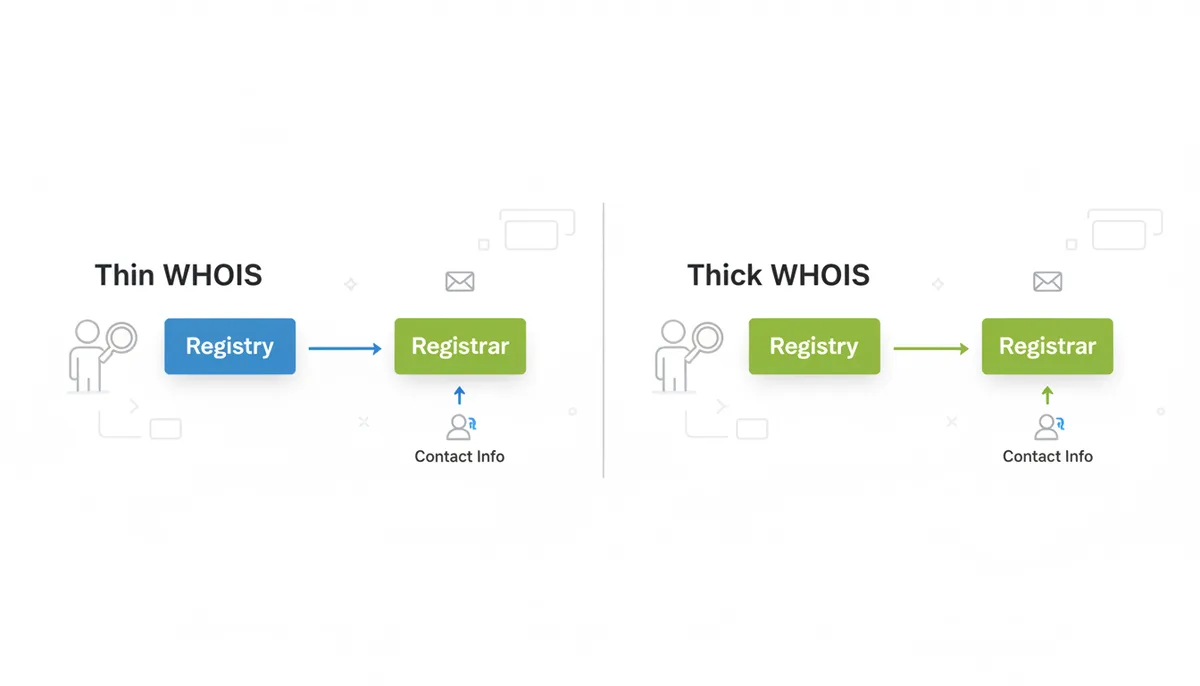
Thin vs. Thick WHOIS: Why You Sometimes Have to Look Twice
You might run a WHOIS lookup and find that the results seem strangely "thin." You see the domain name and the registrar, but all the contact information is missing, even though the domain doesn't appear to be using a privacy service. In the modern era, an incomplete record is usually not a sign of a "thin" registry, but rather a result of how data is being retrieved and protected.
There are three main reasons why a WHOIS result might feel sparse:
- Privacy Redaction (GDPR): This is the most common cause. Due to global privacy regulations, registrars often redact the Registrant, Admin, and Tech contact details by default. Even if you perform a more detailed query, the name and email will likely remain hidden behind "Data Redacted" or a proxy service. This is a legal barrier, not a technical one.
- Referral-Based Lookup Behavior: Historically, a "thin" WHOIS meant the registry only held basic info and required you to query the registrar's server separately to get the details. While this is less common with modern gTLDs, some older or specialized extensions still require this two-step process. If your results look empty, try querying the registrar's specific WHOIS server directly.
- RDAP Access Differences: As the industry moves toward the Registration Data Access Protocol (RDAP), the way data is served is changing. RDAP is designed to be more structured, but it also allows for more granular access control. Depending on the tool you are using, you may only be seeing the public-facing "subset" of the data allowed for unauthenticated users.
If you are investigating a domain and the contact information is missing, do not assume the data doesn't exist. First, check if there is a proxy email address provided. If not, check the "Abuse Contact" field; while it won't tell you who the owner is, it is the only way to reach someone who can take action regarding the domain.
Beyond Domains: How to Read an IP WHOIS Record
If a domain is redacted and the proxy service is unhelpful, your next move is to look at the IP address. Every website lives on a server with an IP address, and those addresses are governed by a completely different set of rules and organizations.
While domains are managed by ICANN-accredited registrars, IP addresses are managed by Regional Internet Registries (RIRs). Depending on where the server is located, you will be looking at data from ARIN (North America), RIPE NCC (Europe/Middle East), APNIC (Asia/Pacific), or LACNIC (Latin America/Caribbean).
When you run an IP WHOIS lookup, you aren't looking for a person; you are looking for the infrastructure provider. The most important fields in an IP record are:
- NetRange/CIDR: The specific block of IP addresses this address belongs to.
- OrgName: This tells you who owns the IP block. Usually, this is an ISP (like Comcast) or a cloud provider (like AWS or DigitalOcean).
- Abuse Contact: This is the most vital field. If a specific IP is attacking your network, you don't contact the person using the IP (who might be a victim of a botnet); you contact the Abuse Contact of the OrgName. They are the ones who can actually shut down the compromised server or block the malicious traffic at the network level.
| Attribute | Domain WHOIS | IP WHOIS |
|---|---|---|
| Subject | The website name (example.com) | The network address (192.0.2.1) |
| Governing Body | ICANN / Registrars | RIRs (ARIN, RIPE, etc.) |
| Key Information | Ownership and contact roles | Network ownership and ISP details |
| Primary Use Case | Trademark and ownership disputes | Reporting network-level abuse and spam |
The Future of WHOIS: What RDAP Means for You
For forty years, WHOIS has operated as a messy, unstructured text format. If you run a WHOIS query, you get a wall of text that a human can read, but a computer struggles to parse. This is why every WHOIS tool looks slightly different; they are all essentially "scraping" text and trying to make sense of it.
The industry is currently transitioning to RDAP (Registration Data Access Protocol). RDAP is the modern successor, and it changes how you interact with registration data in three fundamental ways:
- Machine-Readable Output: Instead of a wall of text, RDAP provides data in JSON format. This means developers can write scripts that reliably extract a registrant's email or an expiration date without the "guesswork" of text parsing.
- Standardization: RDAP follows a strict structure. Unlike WHOIS, where one registrar might use "Admin Email" and another uses "Email Address (Admin)," RDAP enforces a single way to present data.
- Security and Access: RDAP operates over HTTPS, making it much more secure than the old TCP port 43 method. It also allows for "differentiated access"—meaning a researcher with proper credentials might be able to see more data through RDAP than a random user can through the public WHOIS interface.
While most people will still use web-based tools like whatismyip.com for quick checks, understanding that the underlying protocol is moving toward structured, secure data will help you understand why modern diagnostic tools are becoming significantly more accurate and powerful.
The Anatomy of a DNS Hijack: Reading the Warning Signs
A WHOIS record is often the first place you will see the evidence of a domain hijack, but you won't see a field labeled "Hijacked." Instead, you have to look for the discrepancy between the "expected" state and the "actual" state. A hijack occurs when an unauthorized party gains access to the registrar account or the domain management portal, allowing them to change the Name Servers (NS) to point to their own malicious infrastructure.
To spot this, you must perform a comparative analysis. If you are investigating a brand you know well, you should have a baseline of what their Name Servers should be. Most enterprise companies use their own managed DNS or a known provider like Cloudflare, Akamai, or AWS Route 53. If the WHOIS record suddenly shows a set of Name Servers that belong to a generic hosting provider or a completely unknown domain, the site has likely been redirected.
There is a more subtle version of this: the "Shadow DNS" change. This is where the hijacker doesn't change the Name Servers themselves, but instead changes the specific records (like the A record or MX record) within the existing DNS zone. In this scenario, the WHOIS record will look perfectly normal—the Name Servers will still point to the correct provider—but the actual traffic is being diverted. In this case, WHOIS alone won't save you; you have to move to a DNS lookup tool to see where the IP address is actually pointing.
When a hijack is confirmed via WHOIS, your immediate workflow must be:
- Identify the Registrar: Use the WHOIS record to find exactly which company holds the domain.
- Locate the Abuse Contact: Find the registrar's specific abuse email or portal.
- Initiate an Account Freeze: Contact the registrar's support to report that the administrative contact or the account itself has been compromised. They have the power to place the domain into a "clientHold" status, which can effectively stop the hijack by cutting the domain's connection to the internet while the identity of the true owner is verified.
The consequence of a slow response is catastrophic. In a successful hijack, the attacker can divert not just web traffic, but also email traffic. By changing the MX (Mail Exchange) records, they can intercept all incoming communications, including password reset emails for other services, allowing them to escalate the breach far beyond a single website.
The Cost of Ownership: Transfer Fees and Renewal Math
Reading a WHOIS record is not just a technical task; for business owners and domain investors, it is a financial one. The "Expiration Date" is the most critical number in the record, but it is often misunderstood in terms of the actual cash flow required to maintain it.
There is a significant difference between the "Renewal Price" you see advertised on a registrar's homepage and the actual cost of keeping a domain active. Many registrars use "teaser rates," where the first year of registration is low, but the subsequent renewal is significantly higher. When you are performing a WHOIS lookup on a domain you intend to acquire, you must look at the "Expiration Date" to calculate your immediate capital requirement, but you must also investigate the registrar's specific terms to estimate your long-term operational cost.
The "Expiration Date" in a WHOIS record tells you when the current term ends, but it does not tell you the cost of the error if you miss it. If you miss the deadline, you enter a sequence of phases that vary by registrar and TLD, but generally follow this progression:
- Grace Period: The domain has expired, but you can typically still renew it at the standard annual rate. This period is usually between 0 and 45 days.
- Redemption Period: The grace period has ended and the domain is now "locked" by the registry. To recover a domain in this state, you will almost always have to pay a "Redemption Fee" in addition to the standard renewal fee. These fees can be substantial and vary widely between registrars.
- Pending Delete: The domain is in its final countdown to being purged from the registry. In this phase, the domain cannot be saved; you can only wait for it to drop and attempt to register it as a new entity.
Because these timelines and fees are strictly governed by individual registrars and specific TLD rules, you should never act solely on a WHOIS reading. Use the WHOIS status codes—such as redemptionPeriod—to determine which phase the domain is in, and then immediately verify the exact renewal and redemption costs with your specific registrar before committing any funds.
Edge Cases: Multi-Level Registries and ccTLD Quirks
While the rules for .com and .net are relatively standardized, you will encounter significant friction when dealing with Country Code Top-Level Domains (ccTLDs) like .uk, .de, or .jp. These domains do not follow the same ICANN-centric "thick" or "thin" models that govern the generic TLDs (gTLDs). Instead, they are governed by local registry rules that can fundamentally change how you interpret a WHOIS result.
The first major edge case is "Mandatory Local Presence." For many ccTLDs, the Registrant must be a resident or a registered business within that specific country. If you see a WHOIS record for a .de (Germany) domain that lists a US-based company as the owner, it is a red flag. This usually means the owner is using a "Trustee Service"—a local entity that legally holds the domain on their behalf to satisfy local law. In these cases, the person you see in the WHOIS record is not the actual owner, but a legal proxy.
The second edge case is the "Registry-as-Registrar" model. In some countries, the registry itself handles all registrations directly, meaning there is no intermediary registrar. This eliminates the "Registrar vs. Registry" confusion, but it also means you cannot appeal to a third-party company if you have a dispute; you are dealing directly with a government-affiliated or national body.
The third edge case involves "Privacy Tiering." In some jurisdictions, privacy protection is not an "all or nothing" affair. You might see a WHOIS record where the Registrant's name is hidden, but the Administrative Contact's name is public. This happens when local laws mandate that while personal privacy is protected, certain "official" roles must remain transparent for legal accountability. When reading these records, if you see a mix of redacted and non-redacted fields, do not assume the whole record is unreliable; instead, treat the non-redacted fields as the legal anchor points for your investigation.
Frequently Asked Questions
What can I do if the WHOIS contact information is clearly fake or outdated?
You can file a WHOIS Inaccuracy Complaint directly with the domain's registrar or through ICANN's formal complaint process. Registrars are contractually obligated to maintain accurate data. If a company is using a fake address to evade legal service, the registrar is the entity responsible for investigating and enforcing those accuracy standards.
If I use a WHOIS privacy service, is my identity completely hidden?
No. Your identity is hidden from the general public and automated scrapers. However, it is not hidden from law enforcement, trademark holders with a legitimate legal claim, or ICANN. The privacy service acts as a buffer, but they are legally required to cooperate with authorities and valid legal processes.
Why does a WHOIS lookup sometimes fail or time out?
This usually happens for one of three reasons: the registry's server is down for maintenance, your network is blocking TCP port 43 (the standard port for WHOIS), or you have hit a "rate limit." Most WHOIS servers will temporarily block your IP address if they detect you are making too many requests in a short period of time.
Is it legal to scrape large amounts of WHOIS data?
Automated scraping is generally a violation of the Terms of Service for almost every WHOIS registry and registrar. While the data is "public," using automated tools to harvest it for marketing or building databases often results in your IP being blacklisted. It is better to use official APIs or RDAP if you require high-volume data.
How often is WHOIS information updated?
Changes are updated in near real-time. If you update your contact information or renew your domain, the change should reflect in the WHOIS record almost immediately. However, because of "caching"—where different servers across the world keep their own copy of the data—it can sometimes take a few hours for the update to propagate globally.
Can I find out who owned a domain in the past?
A standard WHOIS lookup only shows you the current state of the domain. If you need to see who owned a domain two years ago, you cannot use a live WHOIS tool. You would need a third-party service that specializes in "Historical WHOIS" lookups, which maintain their own archives of previous registration records.
Sources
- ICANN (Internet Corporation for Assigned Names and Numbers) — Definitions of WHOIS policy, explanations of EPP domain status codes, and the official process for reporting inaccurate WHOIS data.
- IETF (Internet Engineering Task Force) — The primary technical standards for the WHOIS protocol (RFC 3912) and its successor, RDAP (RFCs 9082 & 9083), which define how the protocols function.
- ARIN (American Registry for Internet Numbers) — Authoritative information and documentation on how to perform and interpret WHOIS lookups for IP addresses and ASNs within the North American region.
- European Commission — Official information regarding the General Data Protection Regulation (GDPR) and its impact on the public availability of personal data, which directly led to WHOIS redaction.
- IANA (Internet Assigned Numbers Authority) — The official registry of protocol-level details, including the authoritative list of Registrar IDs and TLDs, which are referenced in WHOIS records.