How to Use IP Lookup, WHOIS, and Blacklist Checks Together Before Trusting a Connection
Step-by-step IP address investigation workflow for analysts: use IP lookup, WHOIS, and blacklist checks to triage, score, and respond to suspicious connections.
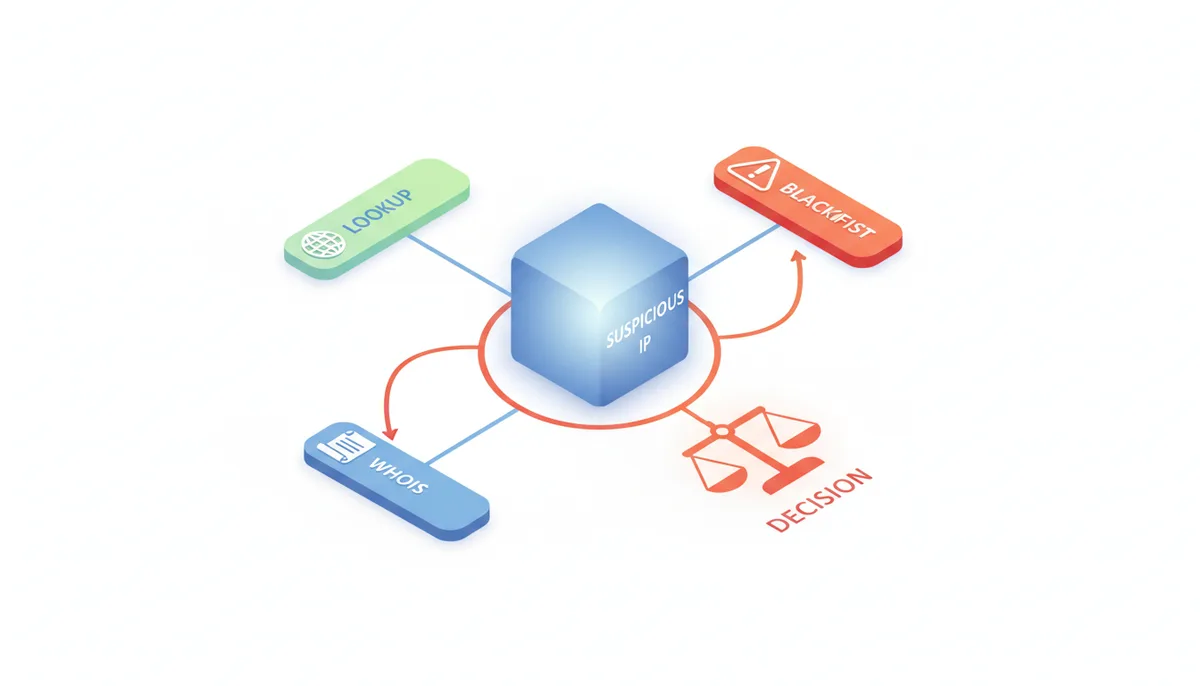
At 2:14 a.m., your authentication service raises an alert: an executive account logged in from 203.0.113.54. The account normally comes from a single corporate network. The address is public. The time is odd. You could block it immediately, and your incident channel would be quiet for a night. You could also be blocking a traveler, a VPN exit used by your own team, or a shared cloud gateway that happens to look unfamiliar.
A single lookup rarely settles that question. One tool says where a packet was likely routed. Another says which organization holds the address block. A third says whether other observers have already seen bad behavior from it. Put them together and you can start asking the only useful question: is this an accident, a probe, or evidence of someone already inside a system?
What Triggers an IP Investigation in the First Place?
Most investigations begin with a mismatch between what an account, server, or user should be doing and what the traffic actually looks like. The address itself is just a pointer into three different contexts: identity, network ownership, and observed reputation.
The strongest trigger is repeated failed access from an unfamiliar network, especially when the service normally has a narrow set of sources. A single typo from a home ISP is noise. Twenty failed administrator logins from a hosting ASN in another country is a pattern.
Another trigger is outbound traffic from an internal system to an address your monitoring has never seen before. That can signal a compromised server fetching a payload, beaconing to command-and-control infrastructure, or leaking credentials to a malicious web endpoint.
Alerts from intrusion detection, malware analysis, or fraud rules should not be treated as final verdicts. They are leads. A scanner hitting your SSH port from a known research crawler is not the same as a scanner hitting it after your firewall logs show a successful credential attempt from the same range. The first is internet background noise; the second is a breach signal.
Differentiate single-event investigation from threat hunting. Single-event work answers, “What happened here, and should we stop this address?” Threat hunting answers, “What does this IP’s history tell us about a broader campaign?” In single-event work, you focus on account impact, timing, and correlation. In hunting, you group addresses by ASN, netblock, reverse DNS pattern, malware family, or repeated attack tooling. An address can be low-risk in one log entry and high-value evidence in the third log entry that connects it to five other events.
The practical rule is simple: if the alert involves access to an account, data, or privileged system, investigate before you block. If it is a one-off port scan with no account impact, you can often log and move on. The goal is not to identify an IP. The goal is to determine whether its behavior, ownership, and reputation point toward benign network movement, opportunistic abuse, or targeted attack.
What Distinct Role Does Each Tool—IP Lookup, WHOIS, and Blacklist Check—Play?
A single IP address produces three different kinds of truth. One answers context, one answers responsibility, and one answers history. You should treat them as separate evidence layers, because each layer has a different failure mode.
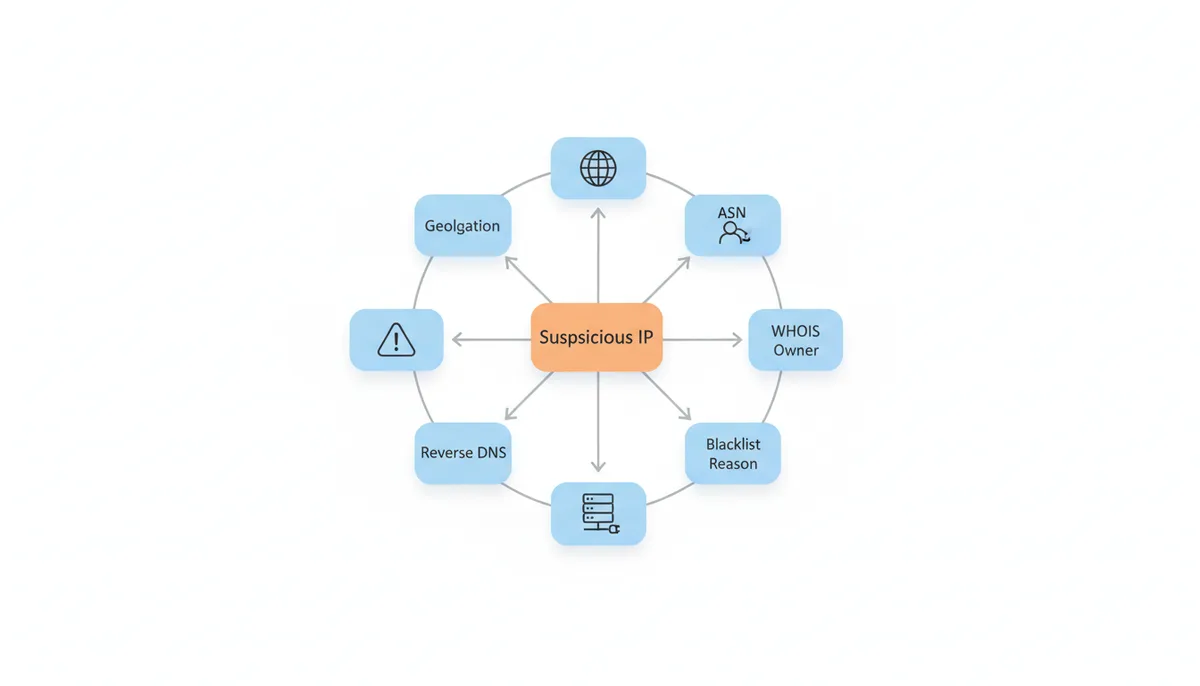
IP lookup gives you network context. It answers where the address is geolocated, which autonomous system announced it, and what provider appears to own or operate the network. That information tells you the type of environment the traffic came from: a home broadband line, a corporate NAT, a cloud provider, a VPN service, a data center, or a mobile network. It is useful for triage, but geolocation can be wrong and network ownership can hide the person behind the machine.
WHOIS gives you administrative context. It answers which organization holds the allocated address block and which contact points are registered for abuse. This is not the attacker’s identity. It is the network operator’s responsibility trail. If a hostile address belongs to a cloud provider, WHOIS tells you who to notify. If it belongs to a hosting company, WHOIS helps you understand whether the provider is generally responsible or frequently exploited. If the registrant information is redacted, that is often a privacy or policy artifact, not proof of fraud.
reputation context is what blacklist checks give you. They answer whether spam filters, malware sensors, threat feeds, or other operators have previously observed abusive behavior from the address. A blacklist is not a court verdict. Some lists are narrow and highly reliable; others are broad and noisy. A listing can mean the address sends spam, hosts malware, scans ports, belongs to a residential range not authorized for direct mail, or was observed being abused by a compromised customer.
| Tool | Primary question | Data it gives you | Primary limitation |
|---|---|---|---|
| IP lookup | Where is the address routed and who operates the network? | Country, region, ISP, ASN, network type, proxy or VPN signals | Geolocation can be inaccurate, especially below country/region level |
| WHOIS | Which organization holds the IP block? | Netblock owner, regional registry, abuse contact, block age, status | The owner may be a cloud or hosting provider, not the actual user or abuser |
| Blacklist check | Has the address been seen in abusive activity? | Listing source, reason, recency, related domains or hosts | Listings can be false positives, stale, noisy, or affected by shared-network abuse |
That table explains why teams make bad decisions. A clean WHOIS record does not prove an address is innocent, because the owner could be a legitimate provider whose customer is the attacker. A clean blacklist check does not prove the address is safe, because new infrastructure may not have been caught yet. A blacklist hit does not always prove malicious intent, because a legitimate mail server can be listed after a compromised printer started sending spam.
WhatIsMyIP.com gives you a quick place to pull those three layers from one interface: public address, ISP and ASN context, and diagnostic checks such as blacklist lookup and WHOIS. The value is not the convenience alone. It is that the same address can be read three ways without switching your mental model.
What Is the Step-by-Step Workflow for a Comprehensive IP Investigation?
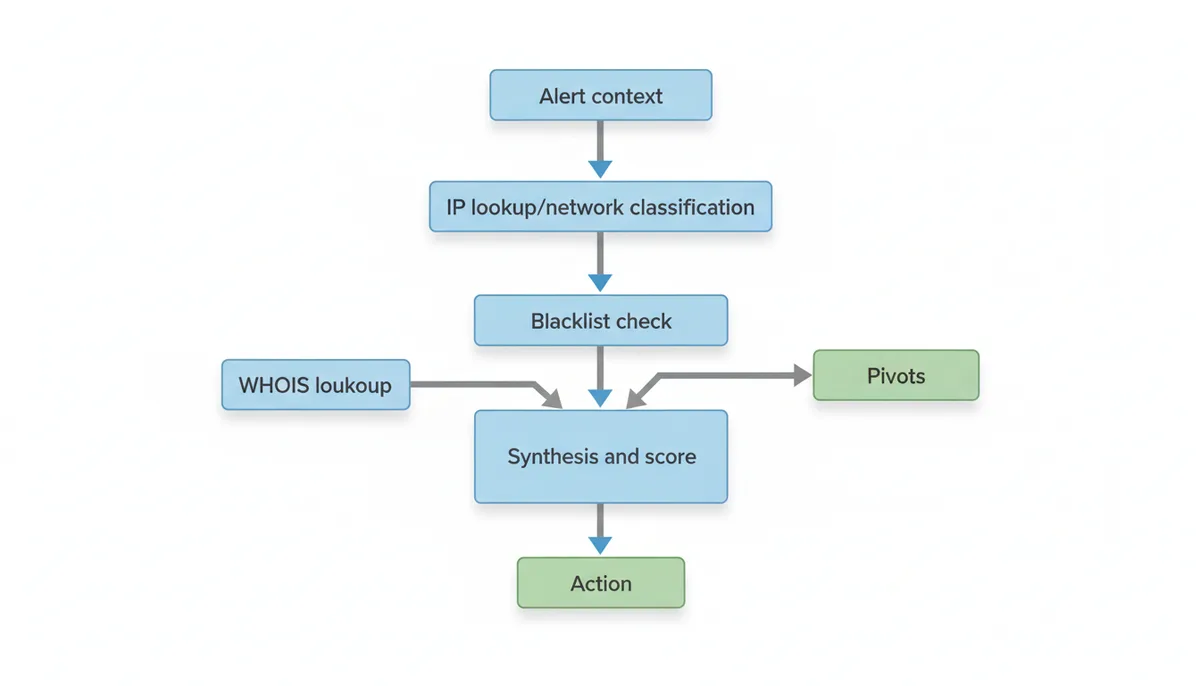
Treat an alert as a question you answer in stages. You are not trying to collect every possible data point. You are trying to find the smallest set that changes your decision.
- Capture the alert context before touching tools. Record the account or system involved, the timestamp, the action attempted, the previous legitimate source network, and whether the alert came from authentication, mail, IDS, or application logs. Without this, a hosting ASN means nothing. If the address belongs to your own cloud vendor, it may be an integration endpoint. If it appears against an admin login, it may be an attacker trying to reuse a valid path.
- Run the IP lookup and classify the network. Write down country or region, ASN, provider name, and network type. Assign your first risk label: low if the address fits the expected network pattern, medium if it is unfamiliar but plausible, high if it belongs to infrastructure that does not normally touch the service. This is not the final answer. It is the first filter.
- Run the blacklist check. Note each source, the listed reason, and the approximate recency. A policy listing on a residential block is different from a malware listing on a hosting block. One obscure spam list is not the same as multiple reputable lists with independent evidence.
- Run the WHOIS lookup. Identify the block owner, abuse contact, regional registry, and netblock age if available. Look for contradiction with the lookup result. A block whose WHOIS owner is a European hosting provider but whose ASN appears to be routed through an unrelated Asian transit network needs closer attention. That does not prove hijacking; it could be a reseller or multi-homing arrangement. It does mean your confidence should not be high yet.
- Pivot outward. Check reverse DNS, compare the address against other failed logins, review traffic from the same /24 or nearby prefixes, and look for matching attack tools or user agents. If multiple addresses from the same netblock hit the same endpoint in a short window, the investigation shifts from “is this IP bad?” to “is this network a campaign source?”
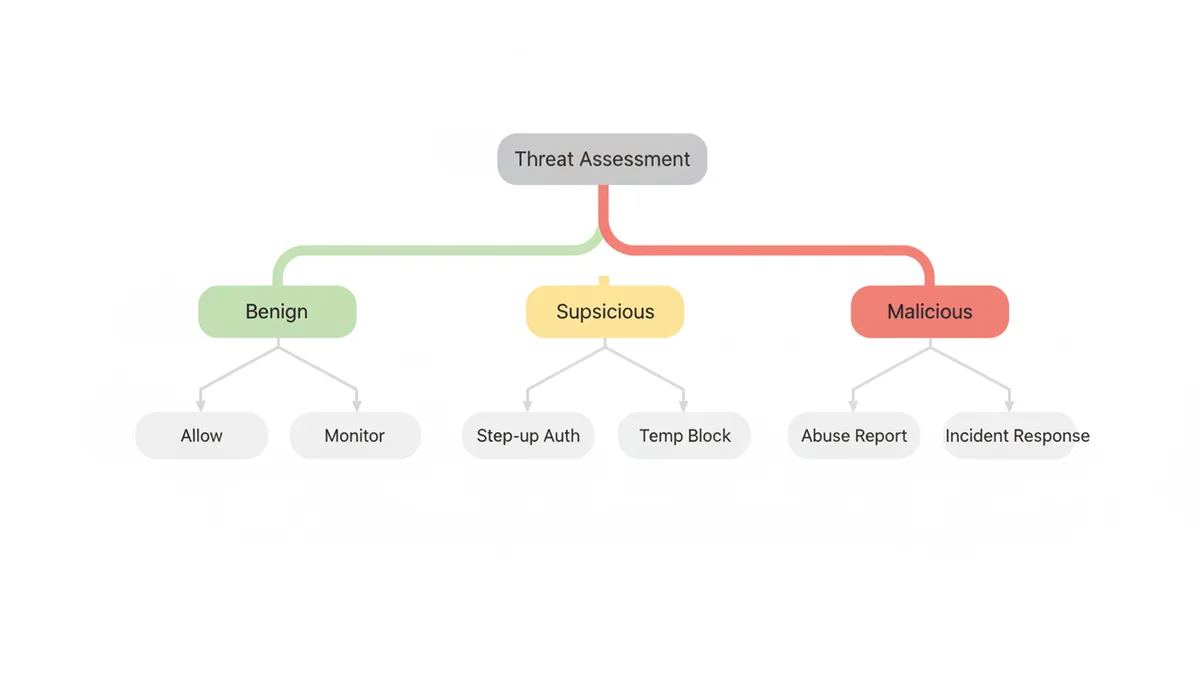
- Synthesize and score. Use a qualitative confidence model: Benign if the network context, account behavior, and reputation align; Suspicious if one strong signal conflicts with the others; Malicious if ownership, reputation, and behavior independently point to abuse.
Worked example, one hypothetical scenario: your alert says an admin panel received 12 failed logins in eight minutes from an external address that has never touched the service. Suppose the IP lookup returns a data center ASN, the blacklist check returns two recent listings tied to malware activity, and the WHOIS record shows a hosting provider with redacted contact fields and no reverse DNS. Your initial label after step 1 was unknown. After step 2, it became suspicious because admin access normally comes from corporate or home networks. After step 3, it became malicious because the reputation signals are specific and recent. After step 4, it remained malicious because the WHOIS owner does not contradict the abuse pattern; it simply tells you who to contact. The account did not log in successfully, so the action is block and monitor, not full incident response. If the logs show a successful login after those failures, the action changes: disable the account, revoke sessions, preserve evidence, and start incident response.
Worked example, opposite direction, again a hypothetical: a user logs in from a residential address in an unexpected country right after a business trip. Suppose the lookup returns a home broadband ASN, the blacklists are clean, and WHOIS shows a local ISP. The only mismatch is location. You do not mark it malicious. You challenge the session, confirm the user, and let it proceed. The same three tools produce a different decision because the network context fits the identity context.
Use the same structure for your own outbound address before you allow a customer through a firewall. If you see your network leaving from an unexpected cloud ASN, check whether that is your own VPN concentrator, a CDN edge, or an unmanaged device that has started sending mail. A quick lookup can save you from chasing ghosts.
How Do You Extract Actionable Intelligence from IP Geolocation and ASN Data?
City coordinates are the least useful part of most IP investigations. They are interesting for reporting, not decision-making. The stronger signal is the ASN and the type of network that owns it. ASN tells you which autonomous system announced the route to the wider internet. That answer is not necessarily the person using the address, but it is the network through which the address appears.
Start by sorting the address into a bucket.
- Major cloud providers. If the ASN belongs to AWS, Azure, or Google Cloud, the address could be a legitimate customer workload, a compromised instance, or a malicious customer spinning up temporary infrastructure. Cloud providers are attractive to attackers because they are cheap, scalable, and often allow rapid account creation. A blacklist hit from a cloud IP frequently points to a compromised or abusive tenant, not the provider itself. Do not block the whole cloud ASN unless you are willing to break unrelated services and can justify the collateral damage.
- Hosting and VPS networks. Data centers and VPS providers are common sources of scanning, spam, phishing, and malware payloads. Some providers tolerate abuse because they compete on anonymity or lax enforcement. If your service has no business reason to accept traffic from hosting networks, a login from a VPS range is already high risk. If your service is SaaS and users connect from cloud VMs, the same bucket may be normal.
- Residential broadband. Home IP ranges can be malicious, but a single residential login from an unexpected city is more often a user on a new network or a family member. Compromised home routers, IoT devices, and malware-infected desktops can still generate abuse. If a residential IP is listed for spam, suspect the network, not necessarily the person: a printer, smart camera, or infected laptop may be the source.
- Mobile and carrier-grade NAT. Mobile IPs are shared through CGN infrastructure. One misbehaving phone can create a temporary reputation problem for many legitimate users. If your fraud rules rely only on ASN category, mobile users will be punished for traffic they did not generate. Add account history, device behavior, and step-up authentication before blocking.
- Corporate, university, and government networks. These can have strict egress controls, but they can also be compromised or used by contractors from shared gateways. A high-trust ASN is not a guarantee of benign activity.
- VPN, proxy, and anonymization networks. These are not inherently malicious, but they hide origin. If your policy says consumers should access the service directly, a VPN exit is suspicious. If your employees travel with company VPNs, it may be exactly what you expect. The ASN can tell you whether the exit belongs to a known commercial VPN provider, a self-hosted proxy, or a residential proxy marketplace.
Then compare network type to service type. A US-only banking admin interface receiving login attempts from a Seychelles hosting ASN is immediately high risk. A public developer forum receiving the same address may be normal if the forum is worldwide. A file-sharing service seeing repeated uploads from a cloud provider may be a legitimate backup tool. The same address changes meaning when the protected resource changes.
Use IPv4 and IPv6 differently. IPv4 addresses are still the default target for most blocklists because of their long abuse history. IPv6 can be trickier: a provider may assign a large prefix, and blocking a single /128 address can be too narrow if the attacker shifts within a /64. Blocking the whole /64 can be too broad because many legitimate devices can sit behind the same prefix. Start with the exact address and monitor nearby behavior. If multiple addresses in the same prefix show identical attacks, widen the scope with justification.
BGP adds a verification layer. If WHOIS says a block belongs to an operator in country A, but route origin shows it being announced from a transit provider in country B, investigate before treating that as simple geolocation error. Sometimes it is routing complexity. Sometimes it is an abuse-enabling reseller. Sometimes it is a sign that the address space is moving between networks faster than a reputation list can track.
For quick triage, I would classify lookup results this way: expected corporate or residential network with no account anomalies is low risk; known anonymization with successful login is medium risk; hosting or data center touching privileged access is high risk; cloud provider blacklisted for malware is high risk until you identify the customer role. That is not a score formula. It is a starting posture.
How Do You Analyze WHOIS Records for Signs of Deception or Misuse?
WHOIS for an IP is not a confession. It is allocation data. When you query an address, the relevant registry, such as ARIN, RIPE NCC, or APNIC, returns facts about the block to which the address belongs: who holds it, what it is called, how it is routed, when the record changed, and which contacts are registered. RDAP presents much of the same information in a structured form, while the older WHOIS service described in RFC 3912 gives you raw text. Both answer the ownership question, but neither answers “who typed the password?”
Read the record for three things: netblock owner, routing identity, and administrative trail.
The netblock owner tells you which organization accepted responsibility for the addresses. This may be a telecommunications company, a cloud provider, a hosting company, a university, or a government body. If the owner is a major cloud provider and your evidence shows abuse, the investigation should pivot to the customer workload, not the provider. If the owner is a small hosting company with no abuse contact and a recently changed record, your confidence drops.
The routing identity appears as an ASN or origin field in many records. If the ASN does not match the network provider returned by your IP lookup, stop and ask why. It may be a simple reseller relationship. It may be an address block that changed ownership but not routing. It may be a provider that announces blocks on behalf of customers. The mismatch is not automatically malicious, but it is a reason not to trust any single field in isolation.
The administrative trail includes abuse contacts, technical contacts, creation and last-update fields, and status labels such as assigned or reserved. Created and updated dates are useful only when they fit the broader pattern. A newly allocated block is not automatically hostile; legitimate networks allocate space constantly. A block that was changed immediately before a burst of malicious activity, has no usable abuse contact, and belongs to a provider with a reputation for weak enforcement is a different animal.
Redaction is the most common WHOIS red herring. Privacy policies, redacted contact fields, and registry-specific presentation differences can make a record look empty even when the block owner is legitimate. Do not treat redaction as fraud. Treat it as lost detail. If you need to report abuse, you still use the abuse contact shown by the registry. If the contact bounces, that matters for your process, but it is not proof the operator is guilty.
Advanced analysis comes from pivoting. If the WHOIS organization name appears in other netblocks, search for those blocks in the same registry. If a domain used in phishing shares the same organization name, netname, or unredacted abuse email, expand your investigation from one IP to a set of infrastructure. For IP records specifically, nameserver pivots are usually weaker than for domain WHOIS; the better pivot points are organization name, netname, abuse contact when visible, and adjacent address blocks.
Worked example: you see 203.0.113.54 sending spam that matches your internal mail format. The IP lookup shows a small hosting network. WHOIS shows a private organization, a redacted abuse contact, and a netblock status that changed recently. Blacklists show nothing, because the abuse is new. That record alone does not make the address malicious. But if your mail server logs show successful authentication from the same IP, your WHOIS finding becomes part of a stronger picture: the address is being used by someone with valid credentials from infrastructure that resists easy accountability. At that point, the action is account compromise response, not just IP blocking.
Use this rule: WHOIS answers who to contact and whether the network’s administrative posture is plausible. It should move your confidence only when it conflicts with lookup or reputation data.
How Do You Interpret Blacklist Results and Differentiate Listing Types?
A listing is a claim made by someone else. Some claims are strong and narrow. Others are broad and policy-driven. Treating every blacklist hit as equally serious is the fastest way to make false positives feel real.
The first question is what the list measures. Spam lists often target mail senders. Malware and phishing feeds target infrastructure used by attackers. Reputation services for cloud controls may flag scanning, credential stuffing, exploit activity, or command-and-control behavior. An address can be clean on one list, noisy on another, and meaningful on a third only because of the activity type it covers.
| Blacklist source | Focus | Evidence type | Removal expectation | Typical operator impact |
|---|---|---|---|---|
| Spamhaus SBL | Spam, malware, phishing, botnet, and abusive hosting infrastructure | Observed abuse and operator review | Manual delisting request after root cause is fixed | Mail rejection and network controls may trust the listing broadly |
| Spamhaus CBL | Compromised hosts and botnet spam senders | Abusive mail traffic detection | Automatic once abuse evidence clears, or via operator request | Outbound mail deliverability drops quickly |
| Spamhaus PBL | Residential and dynamic ranges not authorized to send mail directly | Policy-based range listing | Address the policy condition; direct sending should use approved provider | Small networks see mail rejected without malware |
| Barracuda BRBL | Spam sources and sending reputation | Spam traps and traffic quality signals | Manual delisting request after issue is resolved | Email filtering systems apply stricter mail checks |
| Proofpoint reputation feeds | Malware, phishing, and attack infrastructure | Sensor telemetry and threat analysis | Request or evidence-based expiry | Firewalls, mail gateways, and network controls may enforce broader blocking |
Severity depends on source and specificity. Being listed on a widely adopted feed for malware command-and-control is more important than being listed on a spam trap policy that targets residential mail. Being listed on one obscure RBL because your scanner touched a honeypot may be a false positive. Being listed on multiple reputable feeds with the same reason category is much harder to dismiss.
Recency matters. A malware listing from yesterday tells you the address was recently involved in dangerous activity. A stale listing from long ago may refer to an abuse period that has ended, a reallocated dynamic address, or a customer that left the provider. If the source gives an update date or first-seen date, use it. If it does not, compare the listing age to your own activity timeline.
Read the reason field whenever possible. “Spam trap hit” is not the same as “malware payload detected.” “Compromised host” suggests the address belongs to a device that may be abused. “Phishing URL hosting” points to infrastructure used to lure users. “Policy range” often means mail sending is blocked because the network type is inappropriate for direct SMTP, not because the owner is criminal.
For an IP that matters to you, ask three questions before acting:
- Is the listing category relevant to the alert? A mail sender reputation list should not automatically block a login from that address.
- Is the evidence independent enough? Five obscure lists may agree because one feeds the others.
- Is the address’s role still active? If the listing is for mail abuse and your event is a web login, the link may be weak.
Use blacklist results as probability, not certainty. A malicious reputation score is useful when the reason matches the behavior. A clean reputation score is useful when the network context also fits. Neither answer is sufficient on its own.
How Do You Correlate Findings Across All Three Tools to Build a Coherent Threat Profile?
Correlation is the only step most teams skip. They run a lookup, see a scary ASN, and block. They check a blacklist, see no hit, and relax. The better process is to look for agreements and disagreements between layers, then decide which layer deserves weight.
High-confidence malicious usually appears when all three layers point the same way and the behavior matches the infrastructure type. Example: 198.51.100.22 attempts to access your admin panel. The lookup shows a data center ASN. The blacklist shows recent malware and botnet listings. The WHOIS record shows a hosting provider known for cheap bulk infrastructure, and the netblock was recently created. Reverse DNS is generic or missing. Your logs also show the same address scanning other endpoints from the same /24. That profile is coherent: the address belongs to infrastructure commonly used for abuse, its reputation is bad, and the behavior is not a one-off.
Suspicious, needs more info appears when layers disagree. Example: a corporate user logs in from 203.0.113.54. The lookup says home broadband in an unexpected country. WHOIS shows a local ISP. Blacklists are clean. The user’s device fingerprint changed, or the login came from a browser they have never used. Do not block the address. The network ownership and reputation are weak evidence of malice; the account behavior is stronger. Require MFA, ask the user, and monitor the session. If the user confirms travel or a new network, downgrade the risk. If the user denies it, escalate as account compromise.
Conflicting data can also indicate evasion. Example: a mail endpoint blacklisted for spam is geolocated to a major cloud provider. WHOIS shows the cloud operator. Blacklist says spam from this address. Reverse DNS shows a typical cloud hostname. The likely interpretation is not that the cloud provider is malicious. The likely interpretation is a compromised customer workload or an abusive customer using a rented IP. If you only block the address, the customer can move to a new IP. If you report the abuse and check your own mail relay, you might find the real issue.
Use these correlation patterns:
- Malicious infrastructure pattern: data center or VPS ASN plus recent abuse-specific blacklists plus WHOIS owner with weak accountability plus matching malicious behavior.
- Compromised legitimate system pattern: residential or cloud ASN plus a single reputation hit plus unusual application behavior plus account activity mismatch.
- Travel or proxy pattern: unexpected location plus clean WHOIS plus no reputation hits plus normal account sequence.
- False-positive shared network pattern: mobile or cloud CGN plus listing from one mail policy source plus no direct access failure plus no evidence of account impact.
The strongest profiles are not those that show the most scary data. They are those where independent fields point to the same explanation. If location, ASN, provider category, abuse reason, and account behavior all align, your confidence should rise. If one field is dramatic and the others are quiet, treat it as an outlier until you have more evidence.
What Are Common False Positives and Red Herrings in IP Investigations?
Half of bad IP blocking comes from treating noisy signals as clean truth. The most common mistake is over-trusting city-level geolocation. Databases can lag, providers can advertise prefixes from a different region than the user’s physical location, and VPN or proxy users can appear far from home. If you block a login because the city looks wrong, you will eventually break legitimate users who are simply on a different network.
Carrier-grade NAT creates another trap. A shared mobile egress address can be used by hundreds of customers. One infected phone can make the address look hostile for the rest. If your rule says “block any listed mobile ASN,” you will be blocking real users for behavior they did not cause. A better response is rate limiting, device checks, and targeted account protection.
Shared cloud and hosting networks have the same problem in a different form. A cloud provider’s mail sending range may be listed because one customer abused SMTP. Your own developer’s SSH access to the same provider should not be treated as malicious just because one address is on a mail blocklist. The reason matters. The activity matters. The network category matters. The same provider can be a bad mail source and a fine web server source.
Old blacklist listings mislead when addresses change hands. IPv4 space is reused. Dynamic IP ranges are recycled. If a residential address was abused six months ago and is now assigned to a new customer, the reputation can still drag for a while. If you have no current activity signal, the old listing is evidence of past problems, not present proof.
Generic reverse DNS is overused as a red flag. A mail server without a sensible PTR record for its HELO hostname may need attention. A scanner without one is normal. A cloud VM without one may be normal. Do not penalize absence of rDNS unless the activity requires it, such as outbound mail or authenticated application access that depends on hostname consistency.
Private IP addresses in public logs are another warning. If your web server logs show an RFC1918 address as the client, your load balancer is probably missing a proper X-Forwarded-For header, or you are looking at internal traffic. Investigate the logging path before concluding that an attacker reached the internet.
Use this false-positive rule: if the only signal is location, network category, or a single generic list, and the account behavior is otherwise normal, do not block permanently. If you have a specific listing reason tied to the observed behavior, or repeated account anomalies from the same infrastructure, the false-positive assumption gets harder to defend.
What Advanced Techniques Complement the Core IP Investigation Workflow?
Reverse DNS, port visibility, and aggregated threat intelligence should sit outside the core workflow, not inside every alert by default. They are powerful when used selectively.
rDNS lookup asks whether the address maps back to a hostname. For mail servers, the relationship should be clean: forward A record, reverse PTR record, and HELO hostname should align. A mismatch can cause deliverability problems and may indicate misconfiguration. For web logins, rDNS is less important. A generic hostname does not prove malicious intent, and a fancy hostname does not prove trustworthiness. Use rDNS when the protocol depends on hostname validation, especially SMTP.
Passive port scanning and service banner analysis can change risk. If you have logs showing an IP attempting RDP access from a hosting ASN, the IP is already suspicious. If passive threat data shows the same address exposing an admin interface or vulnerable service, your confidence rises. Be careful with active scanning: it can violate policy, trigger alerts, or affect systems you do not own. Use existing telemetry, honeypot data, or reputable scanning platforms instead of spraying probes at random addresses.
Traceroute helps with routing and network relationships, not physical location. It can show whether an address is behind the same provider chain as other abuse, whether it changes ASNs in unusual places, or whether a suspected reseller is announcing through a third-party transit provider. Use it for pattern confirmation, not as a standalone truth.
Threat intelligence platforms aggregate what many sensors have seen. An IP may appear associated with domains, malware samples, phishing URLs, open ports, or historical ASN changes. This is useful when you need breadth: “Has this address been involved in other campaigns?” But be cautious about single-platform bias. One feed may call an address malicious because it was seen in spam traps. Another may leave it clean because it never sent mail. The best aggregate signal is consistency across independent sources and consistency with your own observed behavior.
Honeypots and sinkholes are advanced but practical for larger teams. Honeypots capture scanning behavior and help separate mass scanners from targeted access attempts. Sinkholes can contain malware infrastructure and reveal which domains or IPs are being contacted by infected devices. If you do not run these, use threat feeds that collect from partners rather than trying to improvise your own infrastructure.
For most investigations, I would reserve advanced checks for these cases: repeated failures from a suspicious ASN, successful compromise followed by outbound traffic, mail servers with deliverability issues, or cloud IPs involved in phishing or malware. Outside those, the core lookup-WHOIS-blacklist cycle is usually enough.
What Actions Should You Take Based on Your Investigation's Findings?
Assessment without action is paperwork. A threat profile only matters when it changes access control, monitoring, abuse reporting, or incident response.
For Benign findings, take no blocking action but record the decision. If the address belongs to a trusted partner, customer VPN, or your own infrastructure, allow it. Do not permanently allowlist dynamic networks unless you control the endpoint and can justify the risk. For cloud services, consider allowlisting account roles, service identifiers, or signed requests instead of broad IP ranges where your architecture supports it.
For Suspicious findings, act at the account or session layer before the network layer. Require MFA, force reauthentication, challenge the session, or apply rate limits. Add the address to a watchlist for 24 to 72 hours if the risk is temporary, such as a login from an unexpected location by a human user. If the same behavior recurs from the same infrastructure, raise the response: block that /32 and monitor the nearby range.
For Malicious findings, block the specific address and protect the affected resource. If the event is credential stuffing from a single address, block that address. If multiple addresses from the same small netblock show the same attack pattern, block the smallest subnet that contains them and justify the scope. If the attacker uses cloud infrastructure, block the address and look for account, workload, or API abuse indicators; blocking one VM may not stop a campaign.
When you report abuse, use the WHOIS abuse contact or provider abuse process. Include the timestamp, the affected service, the source IP, the observed behavior, and any evidence you can share without exposing credentials or sensitive user data. Say what you want: remove the customer, block outbound abuse, or notify the operator. Do not send logs that reveal passwords, tokens, or personal data unless your policy and legal review permit it.
For incident response, document each stage: the lookup result, ASN and provider category, WHOIS ownership, blacklist sources and reasons, reverse DNS, ports or services observed, user behavior, action taken, and owner of the decision. This matters for two reasons. First, it prevents your team from repeating the same work. Second, it shows whether a block was justified when the address later reappears from a new customer.
Temporary blocks are best for dynamic networks, one-off anomalies, and human account behavior. They reduce collateral damage and force review. Permanent blocks are appropriate for confirmed malicious infrastructure that remains under attacker control, but even they need review. An address can be reassigned, a hosting customer can churn, and a clean provider can accidentally become a noisy neighbor. A block that is permanent by default is a block that slowly becomes a false positive.
FAQ
How reliable is IP geolocation data?
Use it for country or regional context, not for street-level truth. City and neighborhood results can be wrong for many benign reasons: mobile users roaming, routing through different provider locations, stale databases, cloud edge networks, or IP blocks announced from an office different from the user’s location. If you need to decide whether an address is malicious, rely on ASN, provider category, observed behavior, and reputation before trusting a city label.
Can a VPN or proxy hide the real information from these checks?
Yes. The user’s real address may be hidden behind the VPN or proxy server. Your investigation will analyze the exit server’s location, ASN, owner, and reputation instead. That is still useful. Known anonymization services have their own risk profile, and their ASN may show commercial VPN infrastructure, residential proxy networks, or self-hosted servers. If your policy distinguishes direct users from proxied users, the lookup result tells you that difference even when it does not reveal the person behind the screen.
What's the difference between a WHOIS lookup for a domain and an IP address?
Domain WHOIS asks who registered a name such as example.com. IP WHOIS asks who was allocated a block of addresses by a regional registry. They reveal ownership of different resources. A domain owner may be anonymous, privacy-protected, or separated from the actual user. An IP block owner may be a cloud provider, hosting company, or ISP that does not know or control every customer action. Both are useful, but they do not answer the same question.
My own IP is on a blacklist. What should I do?
Identify which list is blocking you and what category it claims: spam, malware, phishing, compromised host, or policy. Then check the actual traffic. If you run a mail server, look for compromised devices, open relays, or misconfigured clients sending unsolicited mail. If you are a normal user on dynamic broadband, do not send mail directly through your provider’s consumer IP; use the provider’s authorized mail relay or a legitimate sending service. Once the source of the problem is fixed, follow the blacklist operator’s official removal process.
How often should I re-check an IP that was previously clean?
For long-term connections, recurring customers, or outbound mail senders, periodic checks make sense. Cloud IPs can change customers, dynamic residential IPs can be reassigned, and a previously quiet provider can become a source of abuse overnight. You do not need to poll every address continuously. Trigger rechecks when behavior changes: new ASN, new country pattern, higher failed-login rate, outbound mail failures, or a fresh alert from a monitoring system.
Is it legal to perform these kinds of checks on any IP address?
Generally, yes. IP lookup, WHOIS, blacklist status, and public threat data query information that exists for network coordination, abuse handling, and security operations. That said, laws and company policies vary by country, sector, and data source. Public data does not automatically mean unrestricted collection or use. Also, active scanning of networks you do not own or control can create legal and operational problems. For ordinary defensive investigation against your own logs, use public lookup and reputation data and document your reasoning.
Sources
- ICANN (Internet Corporation for Assigned Names and Numbers) — Claims about the purpose and structure of WHOIS data and the transition to the newer Registration Data Access Protocol (RDAP).
- ARIN (American Registry for Internet Numbers) — Information on how Regional Internet Registries (RIRs) allocate IP address blocks and manage the corresponding WHOIS data for their service regions.
- RIPE NCC (Réseaux IP Européens Network Coordination Centre) — Details on the structure of RIR databases and policies governing the public information associated with IP addresses and ASNs in Europe, the Middle East and parts of Central Asia.
- The Spamhaus Project — Authoritative explanations of how modern, reputation-based DNS blacklists (DNSBLs) operate, their different listing criteria (e.g., SBL, XBL, PBL), and the impact of a listing.
- NIST Computer Security Resource Center — The broader cybersecurity context for IP investigation as a component of threat identification, incident response, and network monitoring, as described in various NIST Special Publications.